


В этой статье
Эта статья доступна на английском языке. Язык интерфейса: Русский.
A consistent AI storyboard helps the viewer follow a subject through a sequence. Important details remain recognizable while each panel adds information. Plan that progression before polishing individual images.
This guide reads Premium Sparkling Lemon Commercial Storyboard from the Gemini Omni library. It is a single eight-panel storyboard image, not a video and not evidence that eight independent generations preserved the same product. Search the exact title in the library; the YouMind OpenLab snapshot supplies the source and credits 𝐌.
1. Write the change the audience should see
The example moves from a cold bottle through opening, pouring imagery, and ingredients to a final packshot. A useful story sentence is: “Introduce a sparkling lemon drink, make its coldness and carbonation visible, and finish on a recognizable product composition.” This is our editorial reading, not a claim about measured product performance.
Keep the scope small. Ask what the final panel should make clear, then remove any panel that adds atmosphere without helping that destination. A social carousel may need fewer scenes than a full commercial treatment.
2. Create a compact visual bible
Record what must remain stable:
- Subject: the same intended lemon-drink bottle and packaging reference.
- Palette: lemon yellow, crystal white, silver, and a restrained dark background.
- Materials: clear liquid, glass, condensation, lemon peel, and ice.
- Light: a deliberate backlight that makes liquid edges readable.
- Continuity: bottle silhouette, cap, label placement, fill level where relevant, and relative scale.
Separate those constants from what can vary: camera distance, action, viewpoint, and composition. If you have a real product, use approved reference photographs and verify the label and shape. The source storyboard alone does not establish SKU accuracy. The product-image guide explains that boundary.
3. Assign eight panels eight jobs
The supplied prompt describes these scenes:
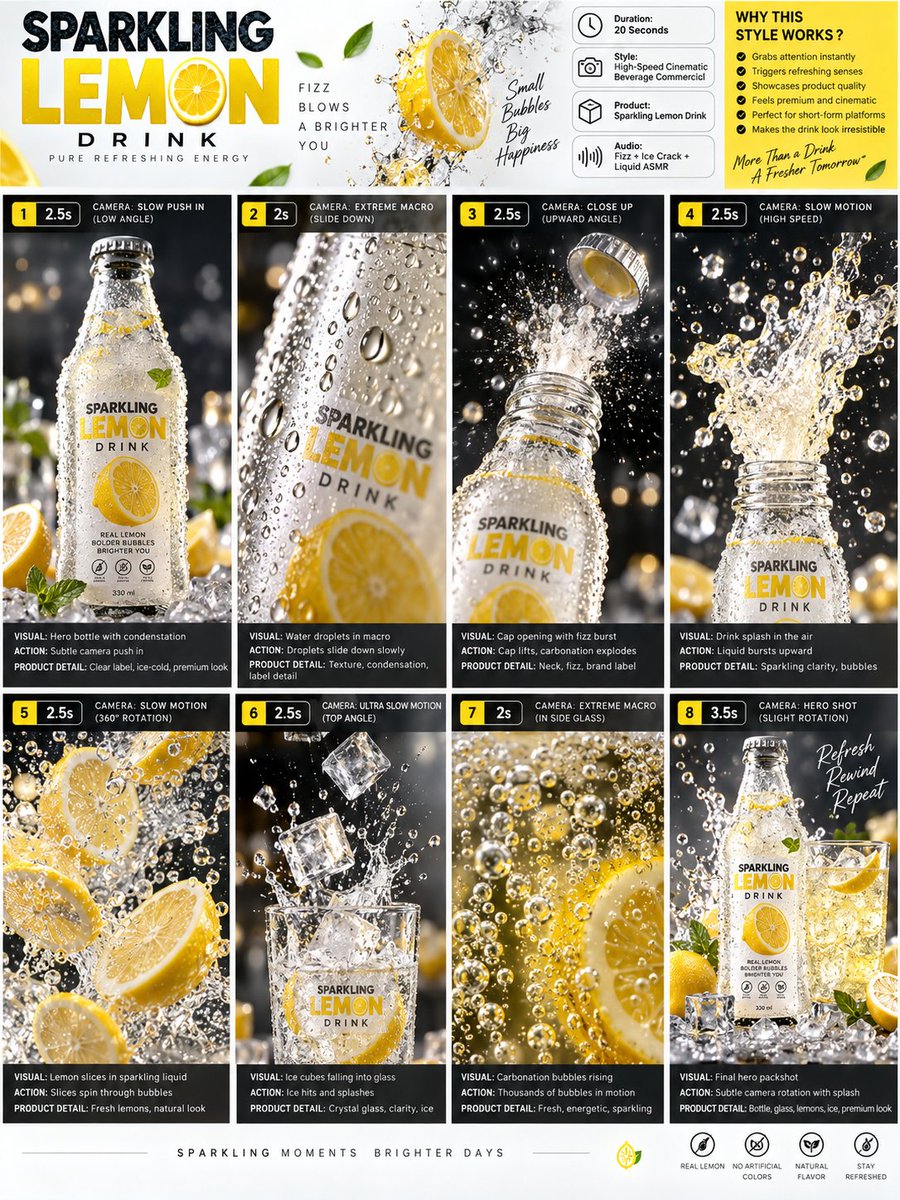
| Panel | Story job | What to inspect |
|---|---|---|
| 1. Cold bottle | Establish the product | Full silhouette and readable subject |
| 2. Water droplets | Reveal surface detail | Condensation belongs to the bottle |
| 3. Cap opening | Introduce action | Cap and opening remain plausible |
| 4. Liquid splash | Add energy | Bottle and splash relationships |
| 5. Lemon slices | Introduce the ingredient | Scale and consistent palette |
| 6. Ice in a glass | Change shot rhythm | Ice, glass edges, and contact |
| 7. Carbonation macro | Emphasize a detail | Bubbles and liquid remain readable |
| 8. Hero packshot | Resolve the sequence | Bottle, glass, lemon, and splash hierarchy |
The source asks for scene number, duration badge, camera direction, visual, action, and product detail in every panel. Those fields make the brief easier to review. Repeat essential instructions in nearby text: the small labels in the 900 × 1200 storyboard should not carry the lesson alone.
4. Write stable direction and current shot separately
The original prompt includes “20 Seconds,” “120fps,” and sound ideas as creative instructions. A storyboard image does not verify video duration, frame rate, or audio. Do not convert those requests into output specifications.
Use this editorial practice brief to plan one panel:
Direction: a sparkling lemon-drink storyboard with a stable bottle reference,
lemon-yellow accents, clear glass, and a consistent backlit treatment.
Keep the bottle silhouette and label placement aligned with approved references.
Current panel: a close view of condensation on the bottle surface.
Show one clear detail; keep the background secondary.
Record the intended camera direction and action as separate storyboard notes.
For another panel, replace only the current-shot section. This is a planning exercise, not the source prompt or a tested generation result. Follow the image-prompt guide when specifying the composition.
5. Review the sequence, then the details
First view the eight panels as thumbnails. Does the product remain the focus? Do wide views, macros, and action panels create a readable rhythm? Does the ending answer the opening? Then inspect the bottle shape, label, cap, lemon scale, glass edges, and light direction at full size.
Name a mismatch before revising: “the cap changes shape” is more actionable than “not consistent enough.” Keep neighboring accepted frames visible. A coherent single-sheet layout does not prove consistency across independent runs, so repeat the check if you generate separate assets later.
6. Choose the final format
Open the AI Storyboard Generator with your story sentence, visual bible, and shot list. Inspect the current tool controls before submitting. Test the selected panels in a carousel or timeline at phone size before adding more detail.
Only animate moments that benefit from motion. Use the image-to-video guide to brief one action at a time and the publishing checklist before export.
Source note: the linked YouMind OpenLab libraries preserve the original prompts and provenance. The planning exercises and review observations here are editorial analysis, not generation tests.
Создать
Plan an AI storyboard with an eight-panel lemon-drink example, a visual bible, shot roles, and continuity checks. Separate a storyboard image from a video.
Создать раскадровкуПрактические руководства, творческие идеи и взгляды на создание изображений и видео с ИИ.
Вам также может понравиться
Ещё несколько идей для вашего следующего проекта.

Plan 6 AI Product Photos That Work as a Campaign
Plan six AI product photos with distinct jobs: hero, material, scale, context, detail, and closing. Learn what a four-package art-direction example can show.

An AI Image and Video Quality Checklist Before Publishing
Review AI images and video before publishing. Check composition, product accuracy, text, motion, and exports, with a real poster constraint counterexample.
Welcome to the SugarCube Journal
Explore practical guides to AI image prompts, moodboards, storyboards, product photos, video workflows, and reviewing visuals before publishing.