


On this page
An AI visual can look polished while still changing product details, displaying placeholder text, or breaking an important constraint. Review it in its final layout, then inspect the details and the actual export.
Our reading example is Minimalist Event Flyer Design in the GPT Image 2 library. Its supplied result is a useful counterexample: the prompt asks for a flat design without outer paper shadows or mockup framing, but the image has a white paper border and a shadow on a gray background. It also uses Japanese copy rather than the English sample placeholders. This is a constraint review, not a documented repair experiment. The article cover is a separate editorial illustration.
Pass 1: Does the visual do its job?
Open the image in its intended placement: a phone feed, product page, slide, or timeline. Add the actual headline and crop. Before zooming, ask:
- Is the subject clear immediately?
- Does it support the message?
- Does the crop preserve the important action or detail?
- Is the headline readable against the background?
- Does something else compete with the intended focus?
For a sequence, view thumbnails together. Every panel should contribute to the progression. The storyboard guide uses eight distinct shot roles to make that check concrete.
Use the poster to audit explicit constraints
Search the library by its exact title. The supplied original creator link, AIGuideNote, and YouMind OpenLab snapshot preserve attribution. Treat the event and venue in the prompt as sample text, not a real event announcement.
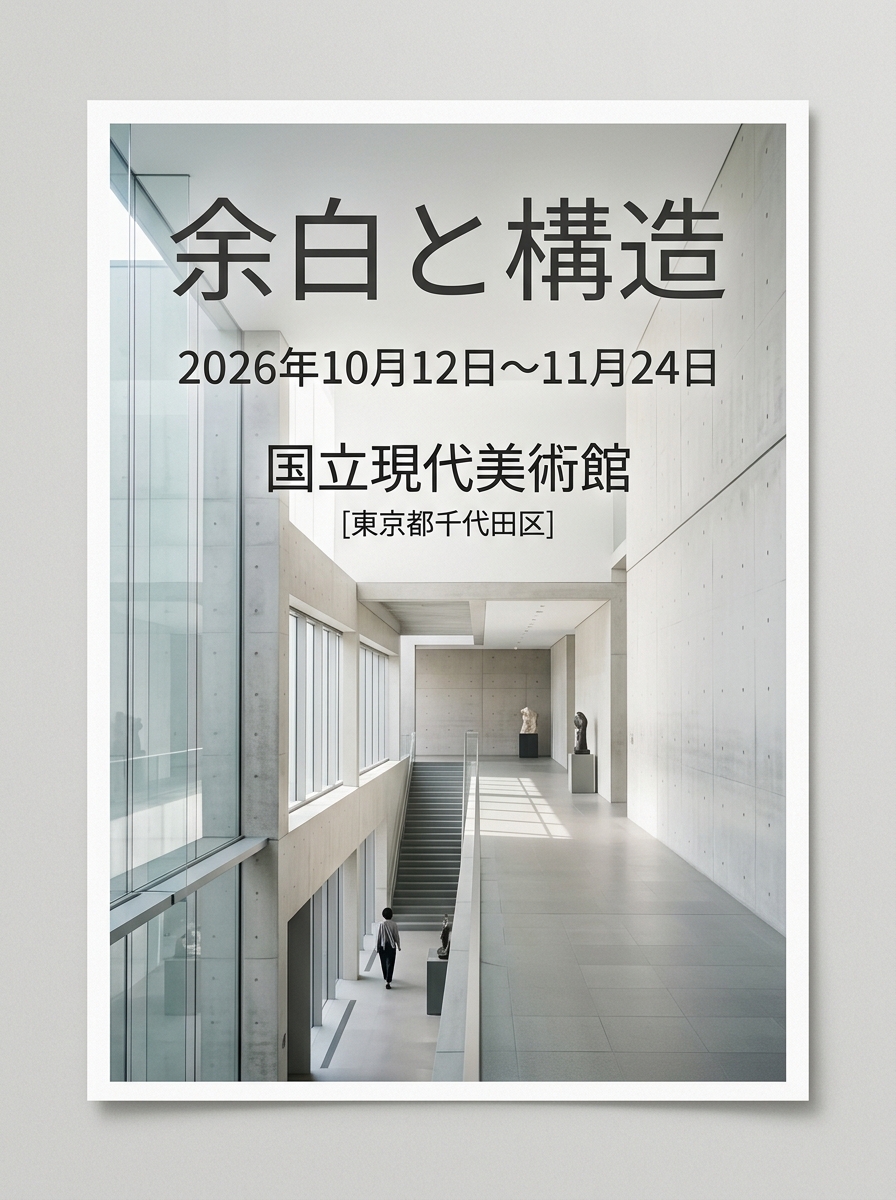
| Requirement in the source | Supplied result observation | Review decision |
|---|---|---|
| Finished flat design fills the canvas | White paper boundary and gray outer background | Does not satisfy the flat-output requirement |
| No outer drop shadows or poster mockups | Shadow appears around the artwork edge | Must revise or choose another result |
| Named event, date, and venue placeholders | Japanese wording and additional location text | Compare every word with approved copy |
| Requested 3:4 format | Recorded image is 896 × 1200 | Close to the ratio, not evidence of exact export sizing |
A polished result can still fail a required output format. Do not describe this poster as fully compliant or a corrected success. If you adapt the template, proofread the new text and recheck the flat canvas. No verified before-and-after repair pair is attached.
Pass 2: Inspect visual relationships
Hands and contact points
Check grips, fingers, and the boundary where a hand meets an object. A hand may look plausible by itself while merging with a chain or handle. Simplify an unclear gesture rather than adding detail around a broken connection.
Shapes and repeated patterns
Follow outlines from end to end. Look for missing joins, repeated controls, inconsistent tiles, or a cap that no longer connects to its bottle. Check recurring details between images as well as inside one image.
Light, reflections, and materials
Do shadows belong to the objects casting them? Does a reflection match the scene? Has matte packaging turned glossy? If structure is sound and the treatment needs another interpretation, you can explore the Realism Enhancer. Treat its output as a new version to review, including identity and lettering, rather than an automatic quality approval.
Product identity and exact text
Compare approved references side by side. Check silhouette, color, proportions, controls, and labels before atmosphere. The product-image guide distinguishes shared art direction from same-product fidelity.
Read every visible word, number, and symbol. The library’s headphone example still says Brand Name; the moodboard contains Lorem ipsum. Neither is finished copy. The prompt guide shows where those placeholders fit into a brief.
Play video, then scrub the whole interval
Watch the entire clip without pausing to judge pace, action, transitions, and the ending. Listen separately if the export includes sound. Then scrub the affected intervals, especially hand contact, turns, occlusions, revealed areas, reflections, and boundaries between shots.
The jewelry library example is about 30 seconds at 720 × 1280 according to the supplied inspection record. Sampled playback through the end does not establish complete frame-by-frame or audio QA. Do not generalize it into a model quality rating. The image-to-video guide explains how to simplify one shot if movement breaks.
Write a fix list by consequence
- Must fix: misleading product information, essential text errors, broken interactions, or failure to meet required output constraints.
- Should fix: weak crop, distracting background, inconsistent color, or unhelpful pacing.
- Optional polish: a subtle preference that does not prevent communication.
Copy this editorial review record:
Requirement: [what the brief explicitly asks for].
Observation: [what is visibly present in the output].
Decision: [keep, revise, or reject, with one reason].
Recheck: [the affected area, neighboring frames, and final placement].
Keep the prior accepted version. A local repair can change another feature, so review the surrounding area again.
Pass 3: Inspect the actual export
Check dimensions, ratio, orientation, crop, legibility, spelling, color, first and last frames, playback, sound, poster frame, and useful alt text. Confirm source permissions and save the file with its prompt, references, settings, and revision record.
Alt text should describe the image’s role in context. If labels carry essential instructions, repeat them in nearby text rather than relying on tiny lettering inside the image.
Open the Realism Enhancer only when its task fits the identified issue. For layout or copy errors, revise those directly and review the new export.
Source note: the linked YouMind OpenLab libraries preserve the original prompts and provenance. The planning exercises and review observations here are editorial analysis, not generation tests.
Create
Review AI images and video before publishing. Check composition, product accuracy, text, motion, and exports, with a real poster constraint counterexample.
Enhance an imagePractical guides, creative ideas, and thoughtful perspectives on making images and videos with AI.
You may also like
A few more ideas for your next project.

How to Plan a Consistent AI Storyboard in 8 Panels
Plan an AI storyboard with an eight-panel lemon-drink example, a visual bible, shot roles, and continuity checks. Separate a storyboard image from a video.

Plan 6 AI Product Photos That Work as a Campaign
Plan six AI product photos with distinct jobs: hero, material, scale, context, detail, and closing. Learn what a four-package art-direction example can show.

Welcome to the SugarCube Journal
Explore practical guides to AI image prompts, moodboards, storyboards, product photos, video workflows, and reviewing visuals before publishing.