В этой статье
Эта статья доступна на английском языке. Язык интерфейса: Русский.
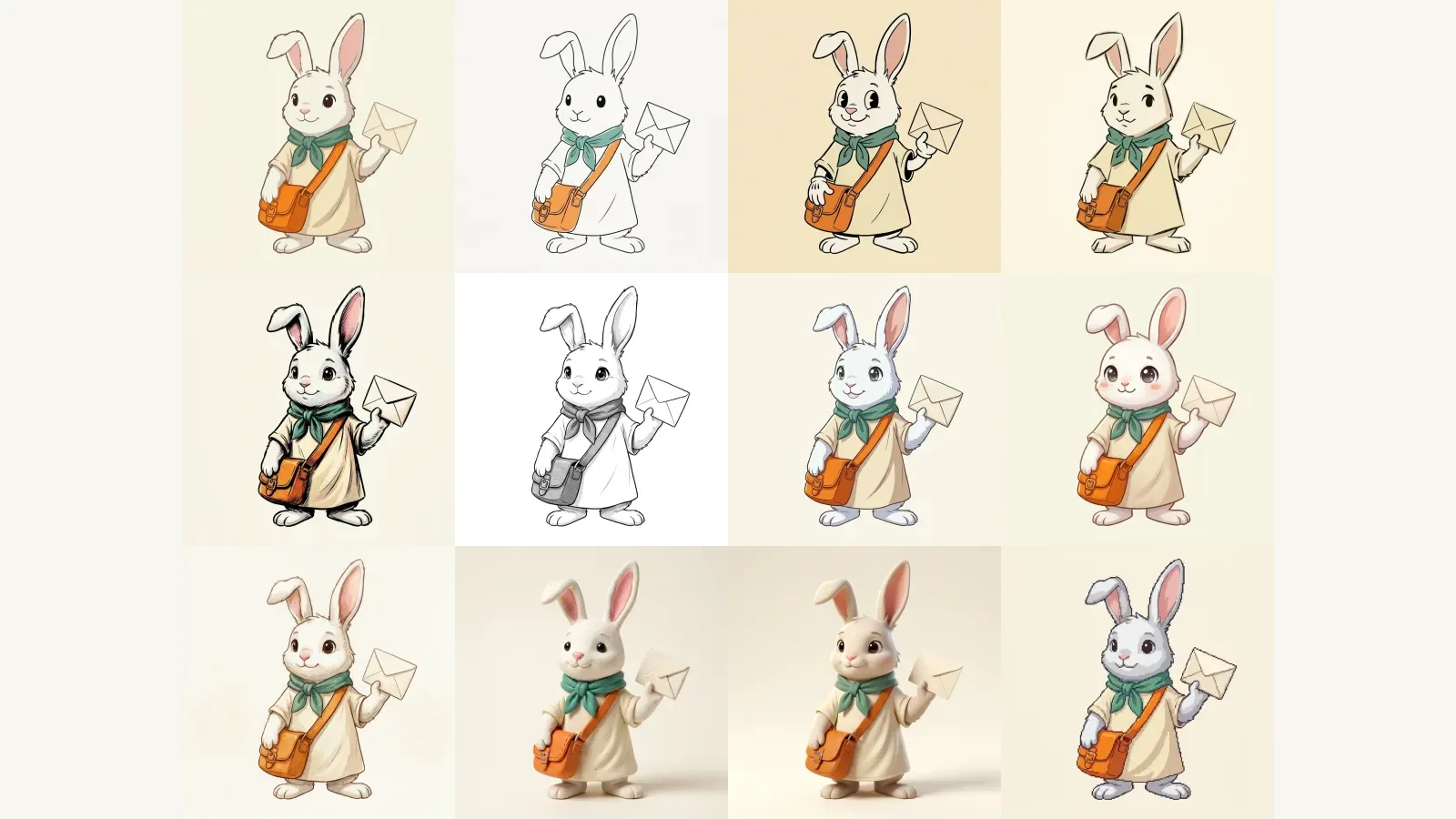
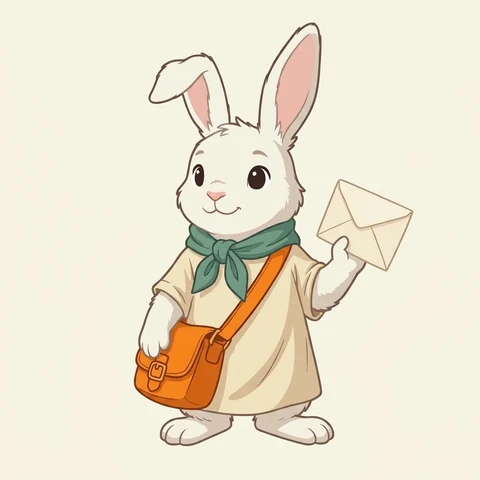
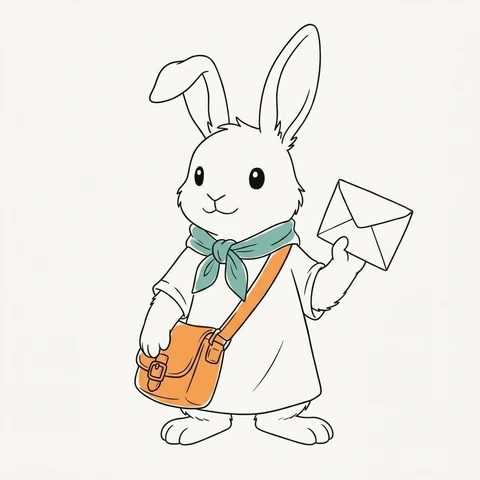
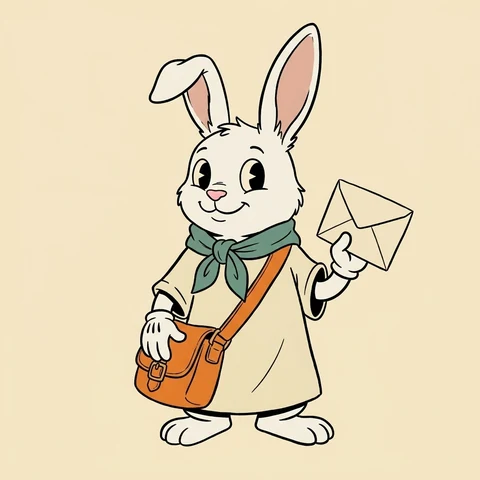
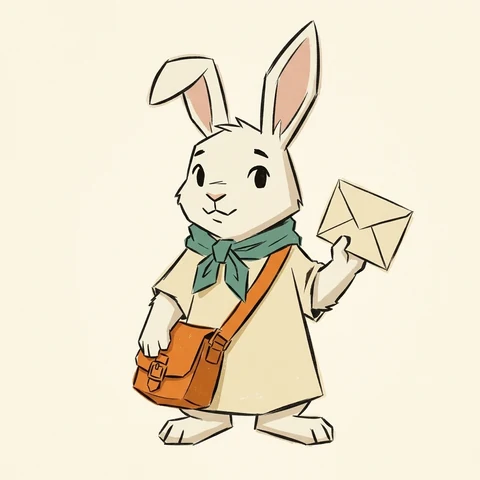
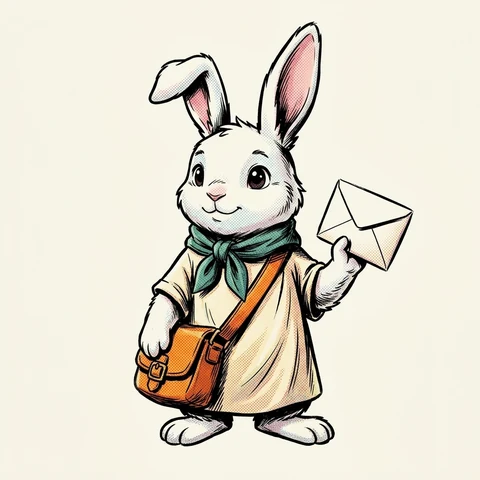
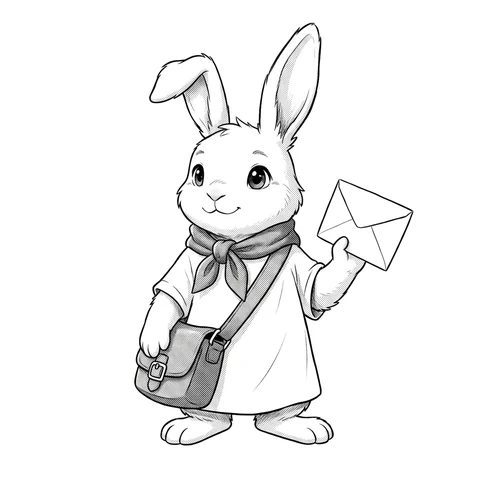
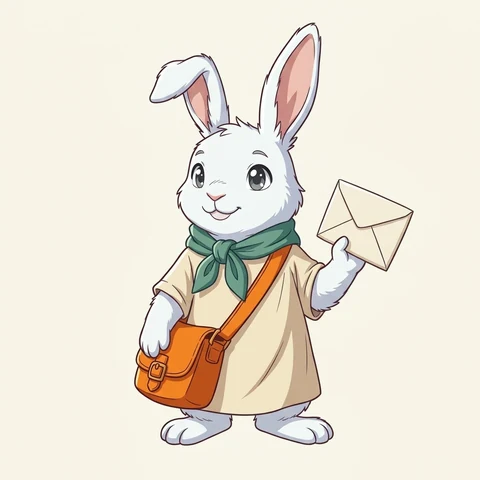
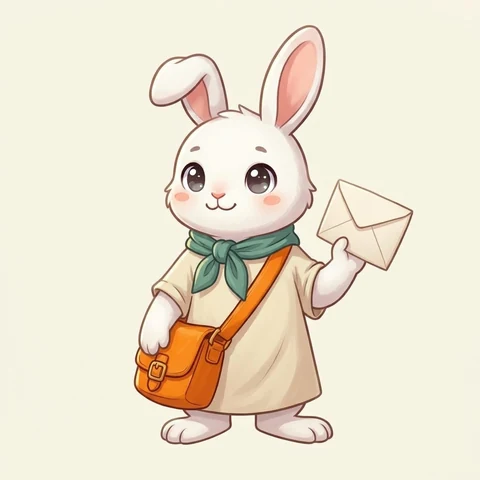
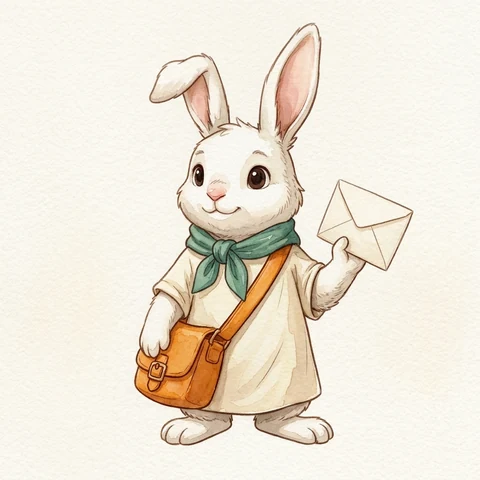
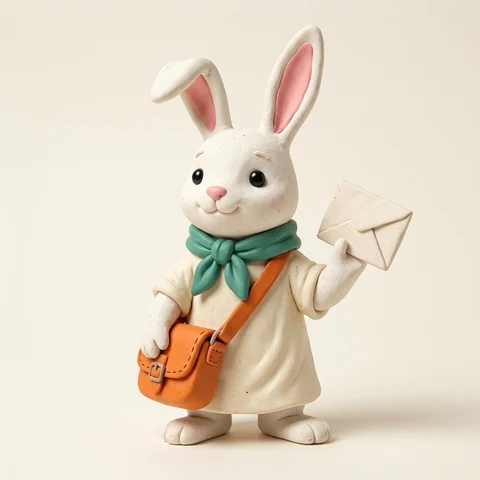
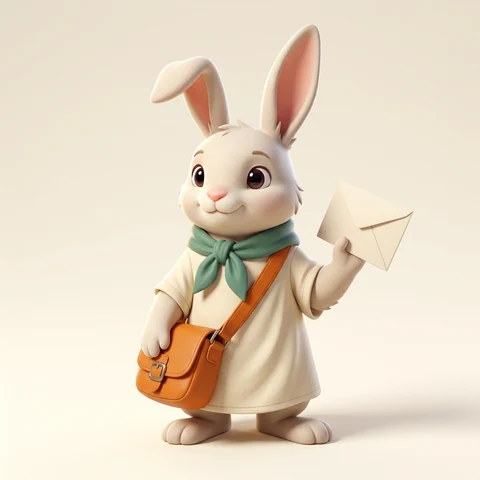
Most cartoon style guides show a different character for every style, which makes it hard to tell whether a look changed because of the rendering or the subject. Below, the exact same original white rabbit courier—teal-green scarf, orange crossbody satchel, bent right ear, and blank envelope—is locked in the same three-quarter pose and lighting so you can compare only the visual treatment.
1. Side-by-Side Style Grid
2. Quick Style Picker by Use Case
- Avatars & Stickers: Start with Chibi or Minimal Line Art. Chibi enlarges the head and eyes so expressions still read at 64×64px, while Minimal Line Art keeps silhouettes uncluttered against chat backgrounds—at the cost of dropping rich surface texture.
- Brand Mascots: Pick Flat Vector or 3D Toon Render. Flat Vector scales cleanly onto packaging, favicons, and UI banners; 3D Toon Render adds soft lighting and depth for hero headers, though it is harder to simplify into a one-color stamp.
- Comics & Storyboards: Choose Black-and-White Manga, Comic Book, or Cel-Shaded Anime. Monochrome screentones keep panel pacing fast and readable without color clashes, whereas Cel-Shaded Anime carries mood and time-of-day lighting across scenes.
- Game Characters: Go with Pixel Art or Clay 3D. Pixel Art locks cleanly onto sprite grids and retro palettes, while Clay 3D gives cozy indie prototypes a tactile stop-motion look—though small props like buckles need simpler geometry.
3. All 12 Cartoon Styles in Detail
01. Flat Vector
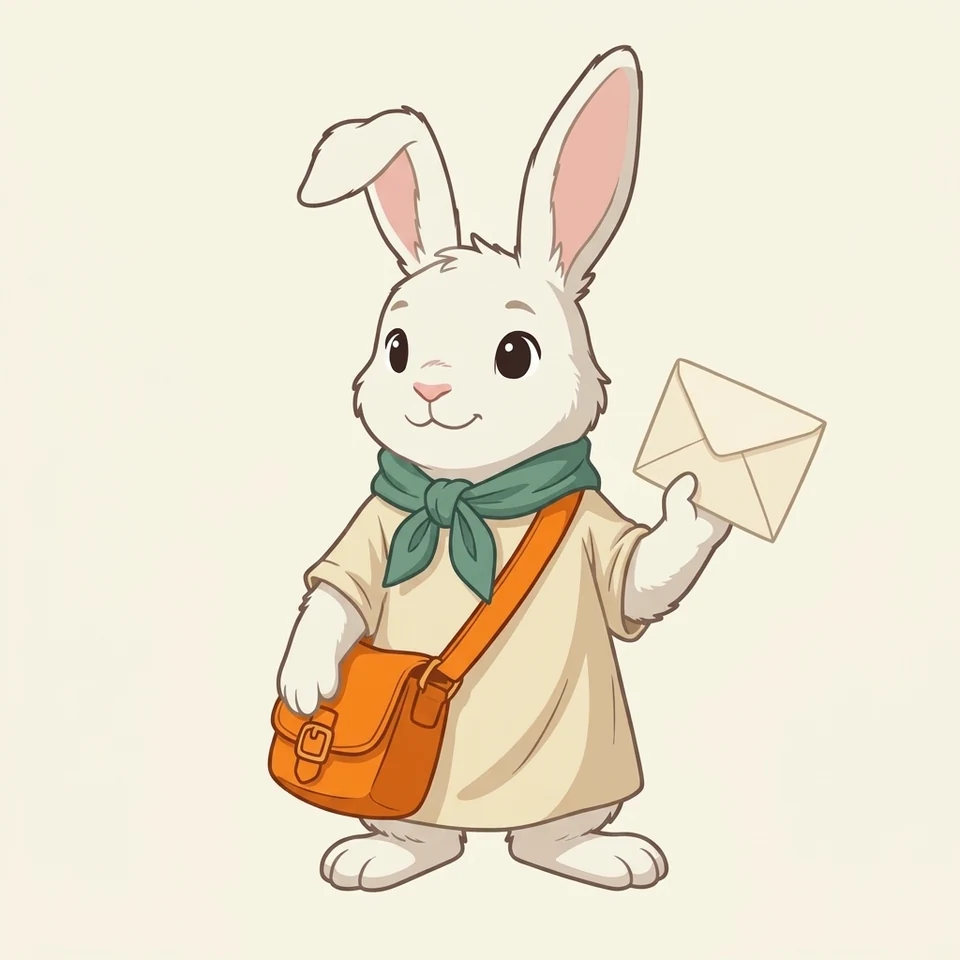 Controlled test: Flat Vector locks in solid color blocks with zero surface grain.
- What to look for: Uniform-weight outer strokes, pure solid color fills with no soft gradients, and completely clean surfaces with zero paper or brush texture.
- Best for: Brand mascots, app onboarding illustrations, and UI badges that need to stay sharp at any size.
- Tested English prompt (copy into tool):
Original white rabbit courier character in Flat Vector illustration style, three-quarter front view, bent right ear, teal-green neck scarf, cream tunic, bright orange crossbody satchel bag, holding a plain envelope, crisp uniform vector outlines, pure flat solid color blocks, zero gradients, zero paper texture, clean warm off-white background
- Action: Copy prompt → Open AI Character Generator
02. Minimal Line Art
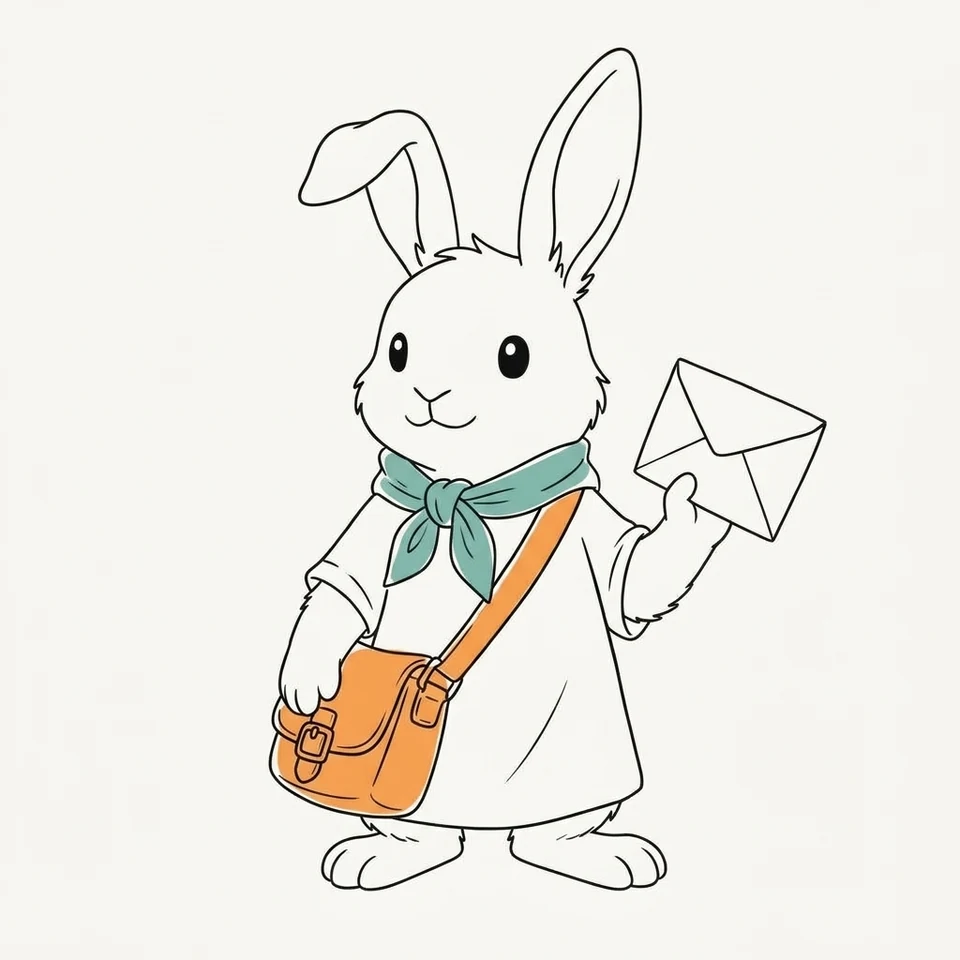 Controlled test: Minimal Line Art strips away shading and leaves only essential contours.
- What to look for: Generous open white space, single-weight black ink contours with minimal interior creases, and only two flat spot-color accents (teal scarf, orange bag) with no volumetric shading.
- Best for: Editorial spot illustrations, clean profile avatars, and minimalist stationery or sticker sheets.
- Tested English prompt (copy into tool):
Original white rabbit courier character in Minimal Line Art style, three-quarter front view, bent right ear, teal-green neck scarf, orange crossbody satchel bag, holding a plain envelope, sparse single-weight black ink contours, generous white negative space, subtle flat spot-color accents only, no shading, clean off-white background
- Action: Copy prompt → Open AI Character Generator
03. Rubber Hose
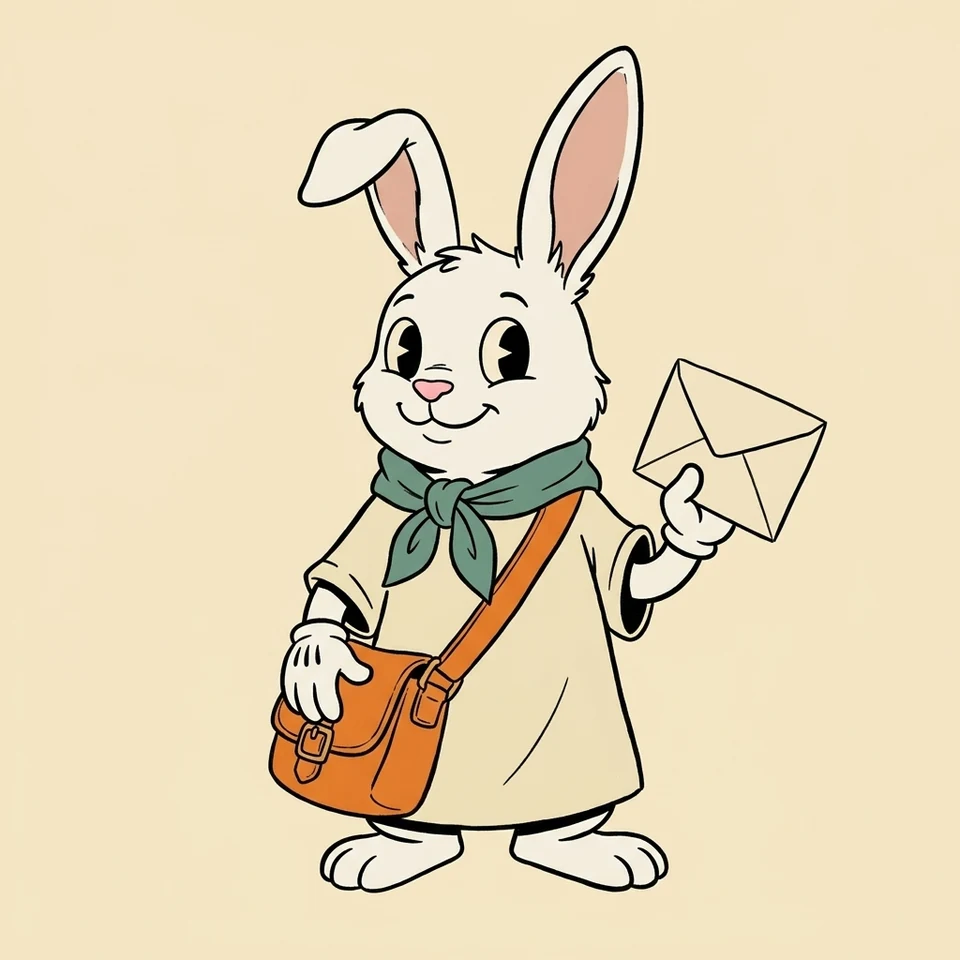 Controlled test: Rubber Hose swaps anatomical joints for flexible curved limbs and pie-cut eyes.
- What to look for: Smooth tube-like arms with no sharp elbow joints, classic pie-cut eyes, three-line white cartoon gloves, and bold black ink outlines over a muted vintage cream palette.
- Best for: Retro mascots, playful merch graphics, and loopable 2D character animations.
- Tested English prompt (copy into tool):
Original white rabbit courier character in 1930s Rubber Hose cartoon style, three-quarter front view, bent right ear, teal-green neck scarf, cream tunic, orange crossbody satchel bag, holding a plain envelope, flexible curved rubber-hose limbs, pie-cut vintage cartoon eyes, white cartoon gloves, bold black ink outlines, muted vintage cream background
- Action: Copy prompt → Open AI Character Generator
04. Mid-Century Cartoon
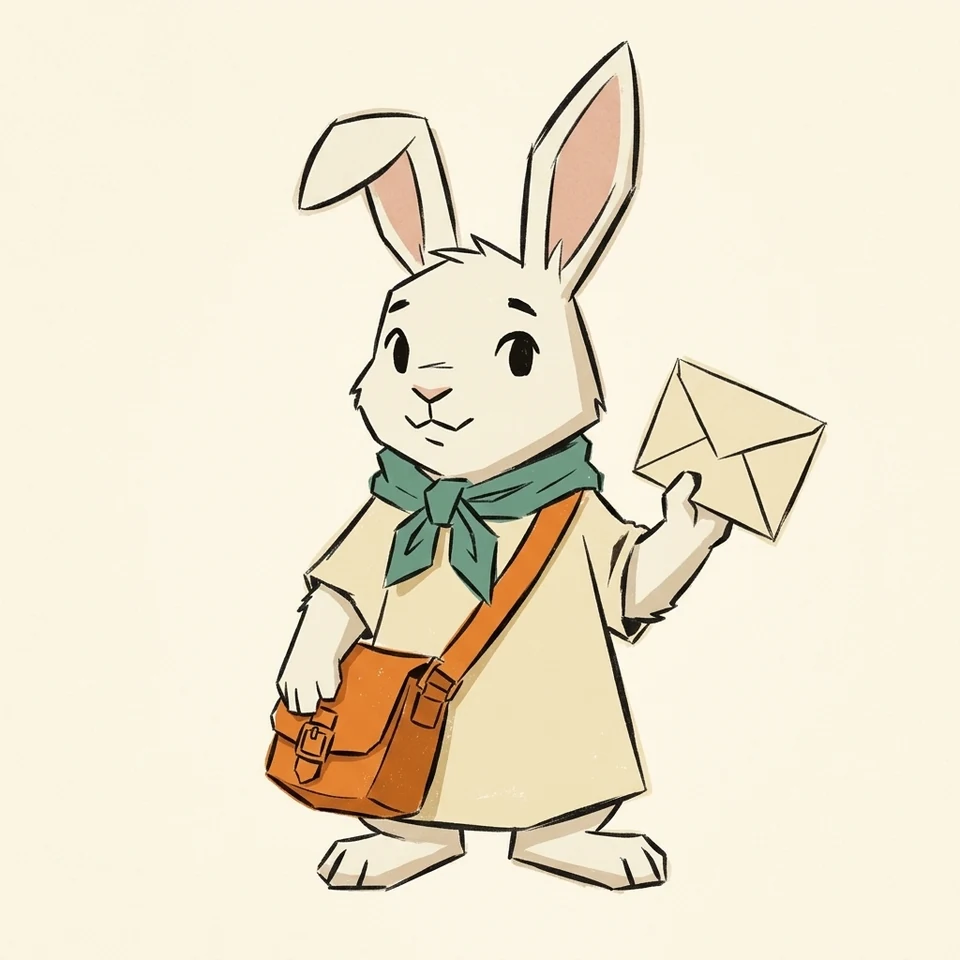 Controlled test: Mid-Century Cartoon sharpens curves into angular geometric silhouettes.
- What to look for: Exaggerated angular shapes (especially in the ears, paws, and tunic hem), slightly offset dry-ink contours, a restrained retro palette, and subtle screenprint grain.
- Best for: Editorial magazine features, poster series, and retro-modern brand campaigns.
- Tested English prompt (copy into tool):
Original white rabbit courier character in 1950s Mid-Century Modern UPA cartoon style, three-quarter front view, bent right ear, teal-green neck scarf, cream tunic, orange crossbody satchel bag, holding a plain envelope, exaggerated angular geometric silhouette, flat overlapping color planes, offset ink lines, subtle vintage print grain, clean warm off-white background
- Action: Copy prompt → Open AI Character Generator
05. Comic Book
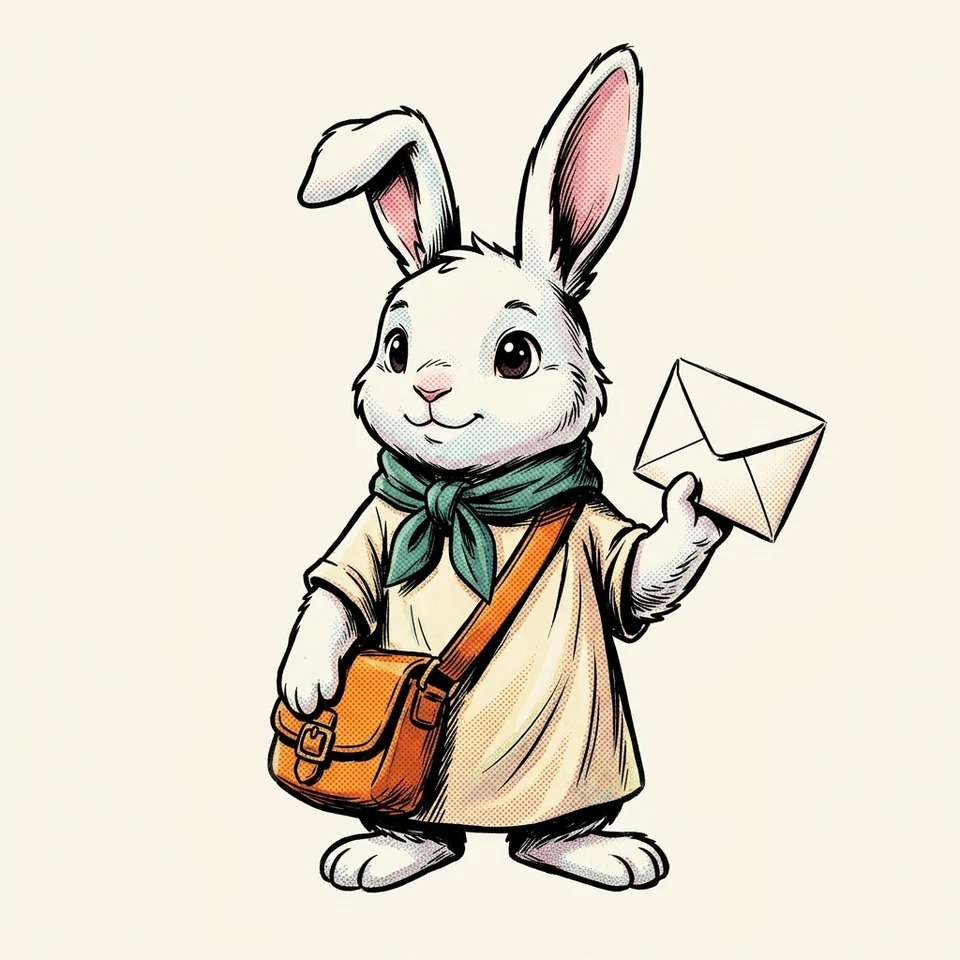 Controlled test: Comic Book adds heavy ink contrast, cross-hatching, and halftone dots.
- What to look for: Variable-weight bold black ink outlines, deep black shadow blocks, directional cross-hatching inside folds, and visible Ben-Day halftone dot patterns across the tunic and satchel.
- Best for: Action-oriented webcomics, zine covers, and high-contrast graphic-novel character intros.
- Tested English prompt (copy into tool):
Original white rabbit courier character in classic Western Comic Book style, three-quarter front view, bent right ear, teal-green neck scarf, cream tunic, orange crossbody satchel bag, holding a plain envelope, high-contrast bold black ink linework, deep black shadows, cross-hatching, visible Ben-Day halftone dot shading, vibrant comic colors, clean off-white background
- Action: Copy prompt → Open AI Character Generator
06. Black-and-White Manga
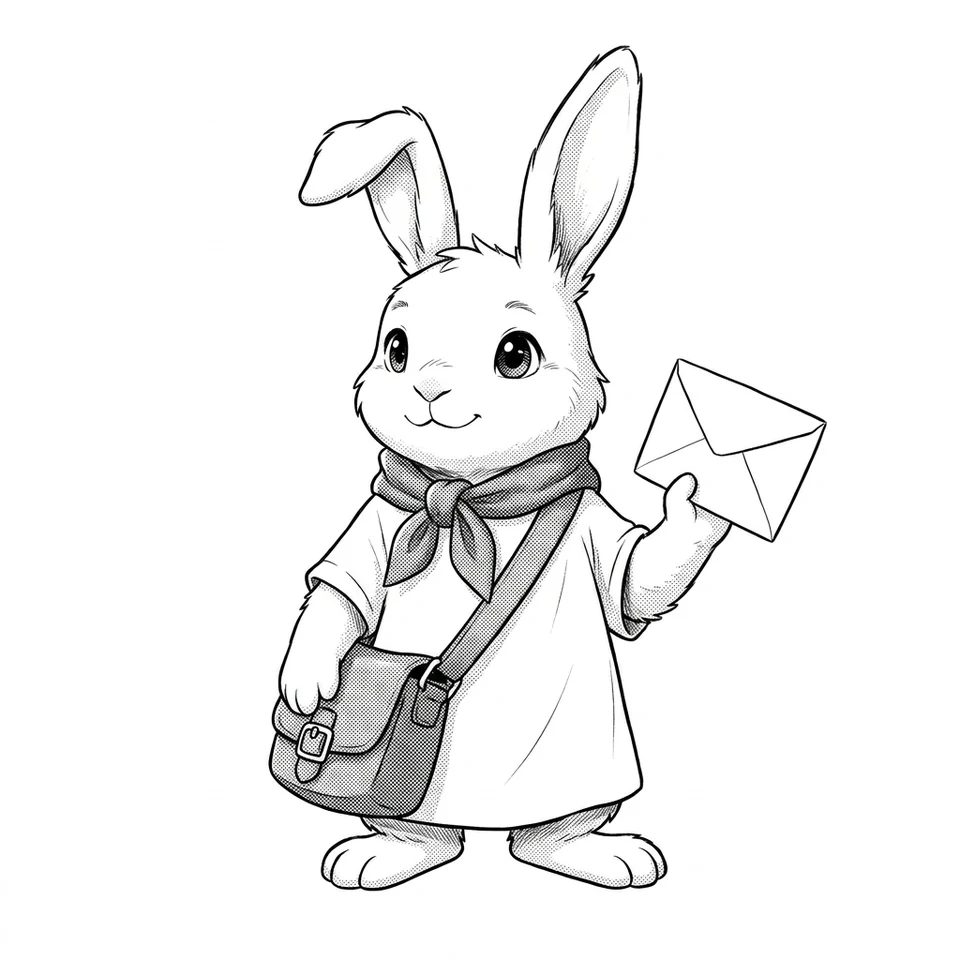 Controlled test: Black-and-White Manga removes all color hues and relies on G-pen ink and screentones.
- What to look for: Pure monochrome black ink on crisp white paper, fine tapered G-pen strokes around the fur and ears, and clean grayscale screentone dot gradients replacing the teal and orange fills.
- Best for: Manga chapter pages, black-and-white story drafts, and print-ready indie comics.
- Tested English prompt (copy into tool):
Original white rabbit courier character in Japanese Black-and-White Manga style, three-quarter front view, bent right ear, neck scarf, tunic, crossbody satchel bag, holding a plain envelope, strictly monochrome black ink and white paper, zero color hues, fine variable-weight G-pen ink lines, authentic grayscale screentone dot shading, clean white background
- Action: Copy prompt → Open AI Character Generator
07. Cel-Shaded Anime
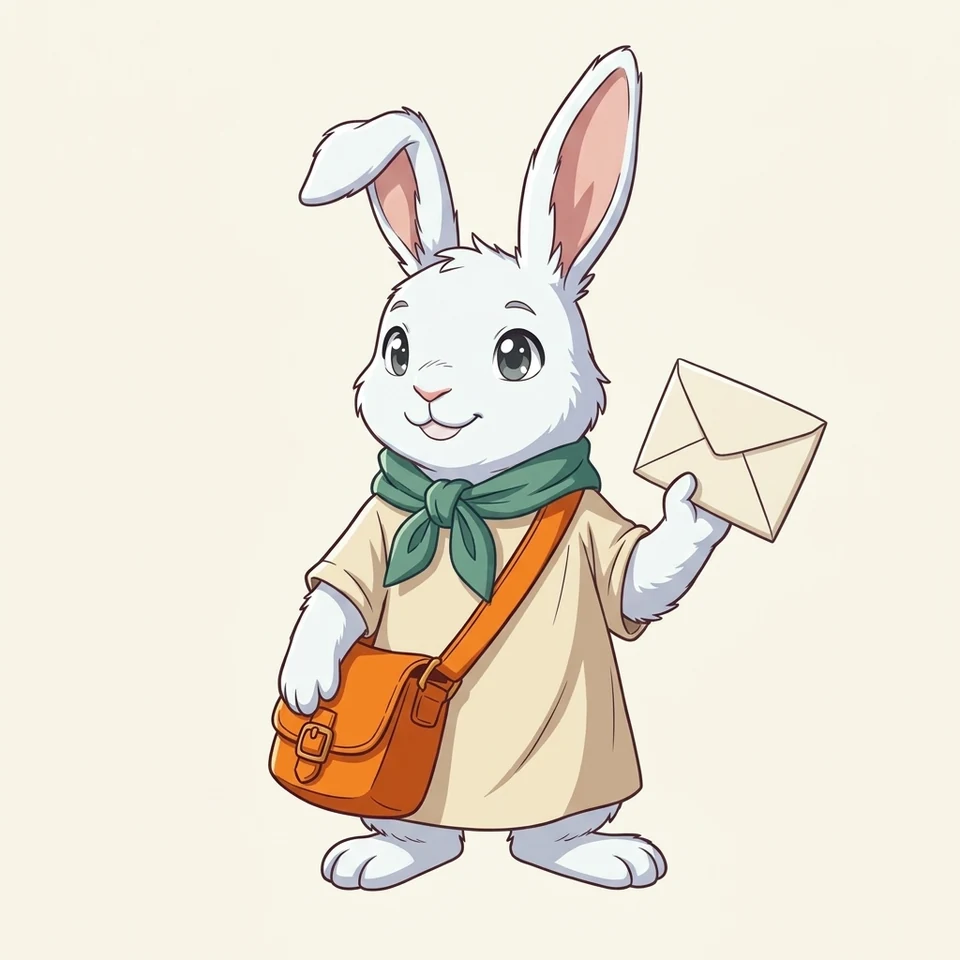 Controlled test: Cel-Shaded Anime separates light and shadow with crisp, unblended edges.
- What to look for: Thin, clean dark lineart, bright saturated colors, sharp hard-edge two-tone cel shadows on the tunic and scarf, and multi-layered eye highlights.
- Best for: Animated shorts, visual novel character sprites, and color storyboards.
- Tested English prompt (copy into tool):
Original white rabbit courier character in modern Cel-Shaded Anime style, three-quarter front view, bent right ear, teal-green neck scarf, cream tunic, orange crossbody satchel bag, holding a plain envelope, crisp thin dark anime lineart, vibrant colors, sharp hard-edge two-tone cel shadows, expressive anime eyes, clean off-white background
- Action: Copy prompt → Open AI Character Generator
08. Chibi
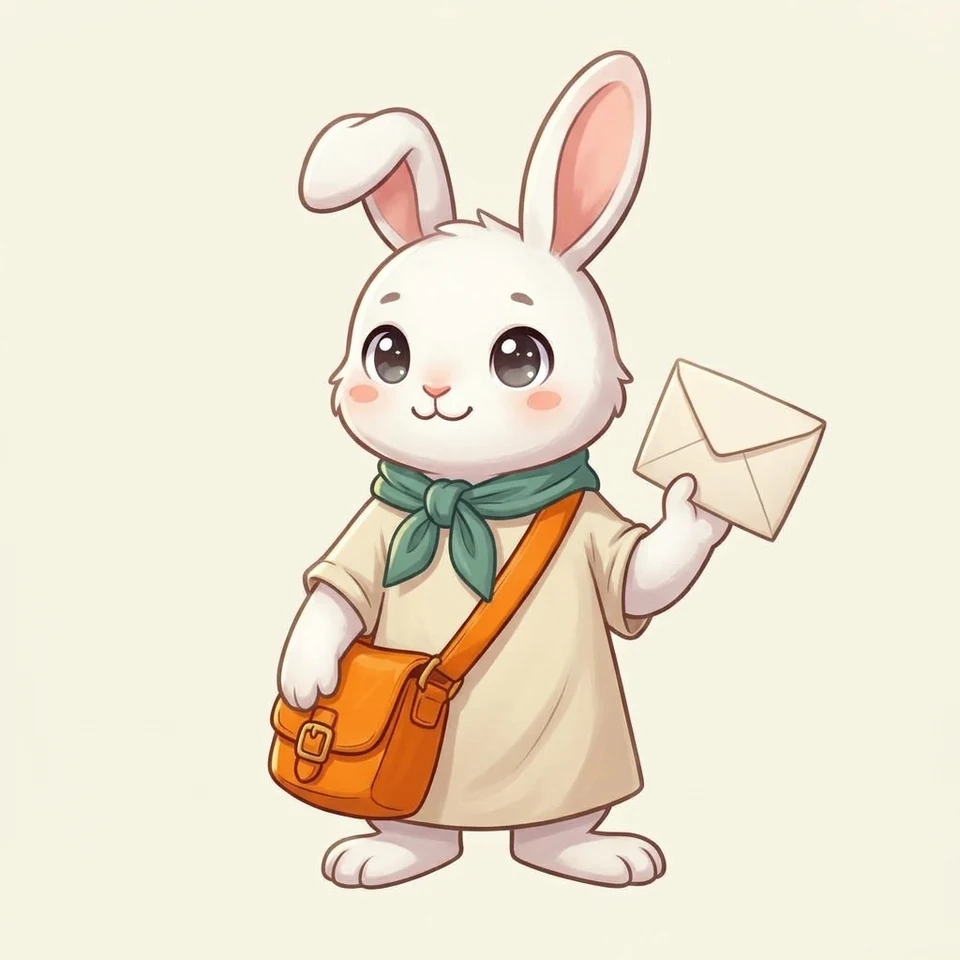 Controlled test: Chibi shifts head-to-body proportions so facial expressions dominate.
- What to look for: Enlarged round head with soft rosy cheek blush, big sparkling eyes, shortened compact torso and stubby paws, and thicker friendly contours.
- Best for: Chat stickers, Discord/LINE emotes, keychain merch, and small-format profile icons.
- Tested English prompt (copy into tool):
Original white rabbit courier character in cute Chibi cartoon style, three-quarter front view, bent right ear, teal-green neck scarf, cream tunic, orange crossbody satchel bag, holding a plain envelope, 2-head-tall chibi proportions, oversized round head, big sparkling eyes, rosy cheeks, tiny compact body and stubby paws, clean warm off-white background
- Action: Copy prompt → Open AI Character Generator
09. Watercolor Cartoon
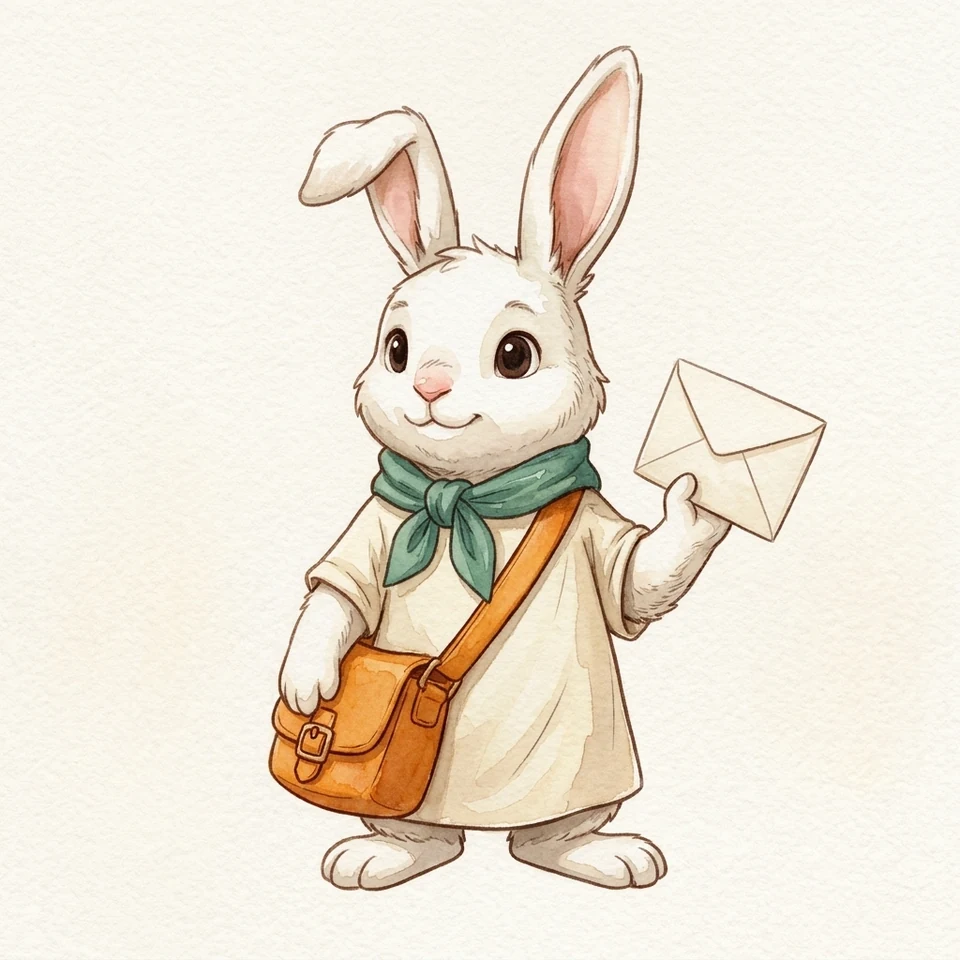 Controlled test: Watercolor Cartoon introduces paper tooth and translucent pigment blooms.
- What to look for: Translucent layered washes where colors subtly pool along edges, delicate warm-brown ink-and-wash outlines, and visible cold-press watercolor paper grain across the whole frame.
- Best for: Picture books, cozy greeting cards, and handmade-feeling seasonal campaigns.
- Tested English prompt (copy into tool):
Original white rabbit courier character in Watercolor Cartoon storybook style, three-quarter front view, bent right ear, teal-green neck scarf, cream tunic, orange crossbody satchel bag, holding a plain envelope, hand-painted translucent watercolor washes, soft wet-edge pigment blooms, delicate brown ink-and-wash outlines, visible cold-press watercolor paper grain
- Action: Copy prompt → Open AI Character Generator
10. Clay 3D
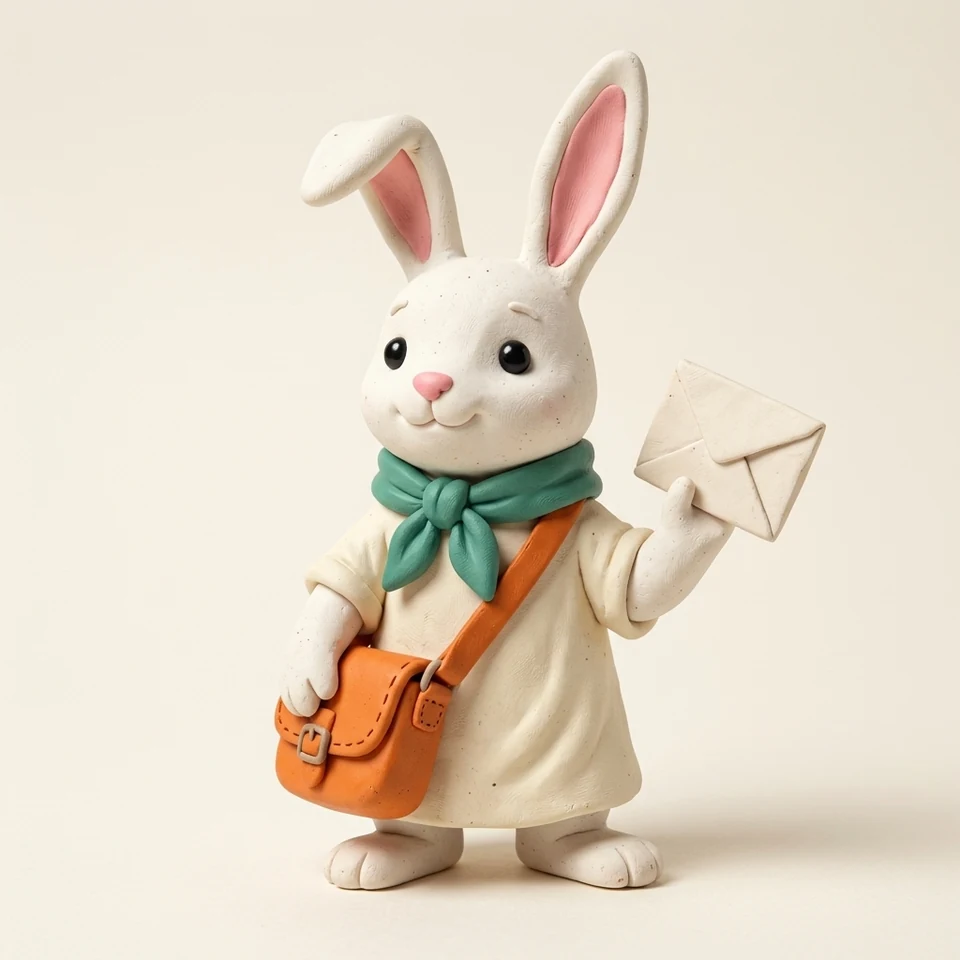 Controlled test: Clay 3D turns flat linework into a matte, hand-sculpted physical miniature.
- What to look for: Zero outlines, matte polymer-clay surface with subtle sculpting seams and tiny flecks, rounded chunky edges on the scarf knot and satchel, and soft miniature studio contact shadows.
- Best for: Cozy game promos, stop-motion-inspired social clips, and tactile hero illustrations.
- Tested English prompt (copy into tool):
Original white rabbit courier character as a handcrafted Clay 3D stop-motion figure, three-quarter front view, bent right ear, teal-green neck scarf, cream tunic, orange crossbody satchel bag, holding a plain envelope, sculpted polymer clay texture, subtle hand-molded seams, matte tactile surface, soft miniature studio lighting and contact shadow, warm off-white backdrop
- Action: Copy prompt → Open AI Character Generator
11. 3D Toon Render
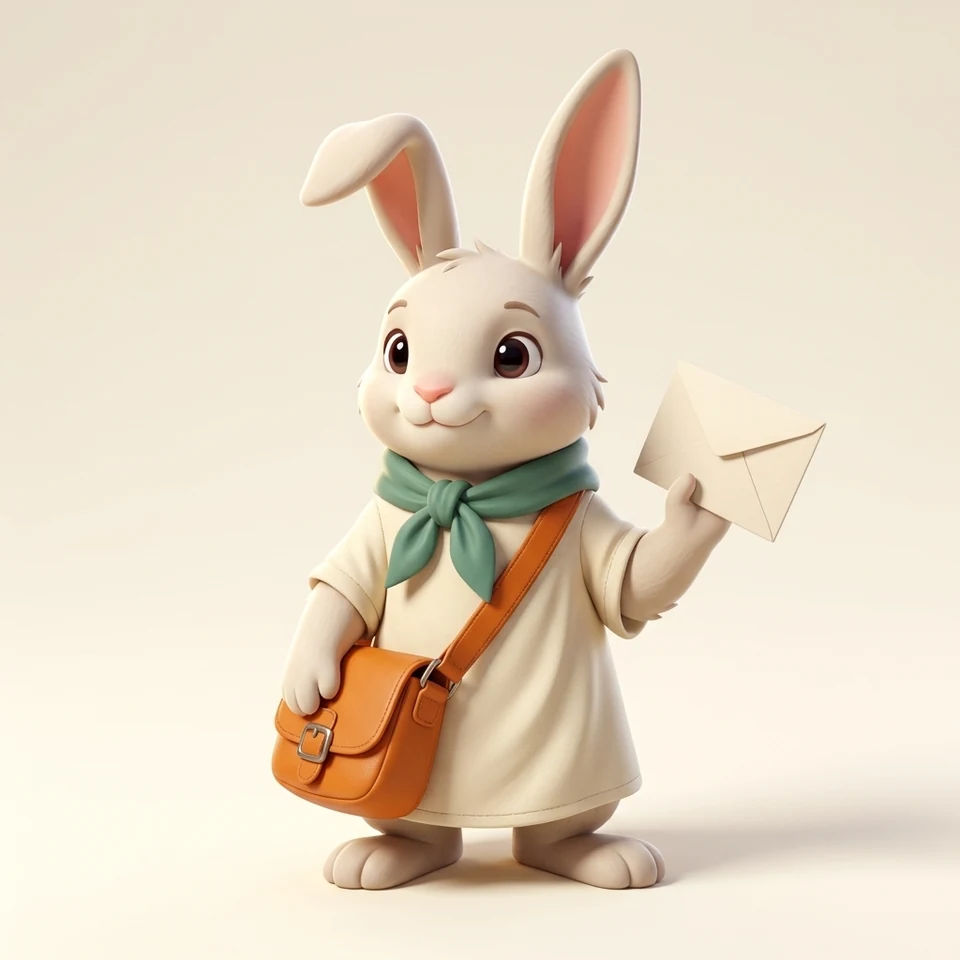 Controlled test: 3D Toon Render replaces clay imperfections with sleek CGI shaders and rim light.
- What to look for: Smooth, blemish-free stylized 3D surfaces, soft subsurface scattering on the ears, crisp rim lighting separating the white silhouette from the backdrop, and glossy reflective eyes.
- Best for: Animated feature pitches, 3D app mascots, and polished landing-page hero visuals.
- Tested English prompt (copy into tool):
Original white rabbit courier character as a polished 3D Toon Render animated film character, three-quarter front view, bent right ear, teal-green neck scarf, cream tunic, orange crossbody satchel bag, holding a plain envelope, smooth sleek stylized 3D surfaces, clean rim lighting, soft global illumination, glossy eyes, warm off-white studio backdrop
- Action: Copy prompt → Open AI Character Generator
12. Pixel Art
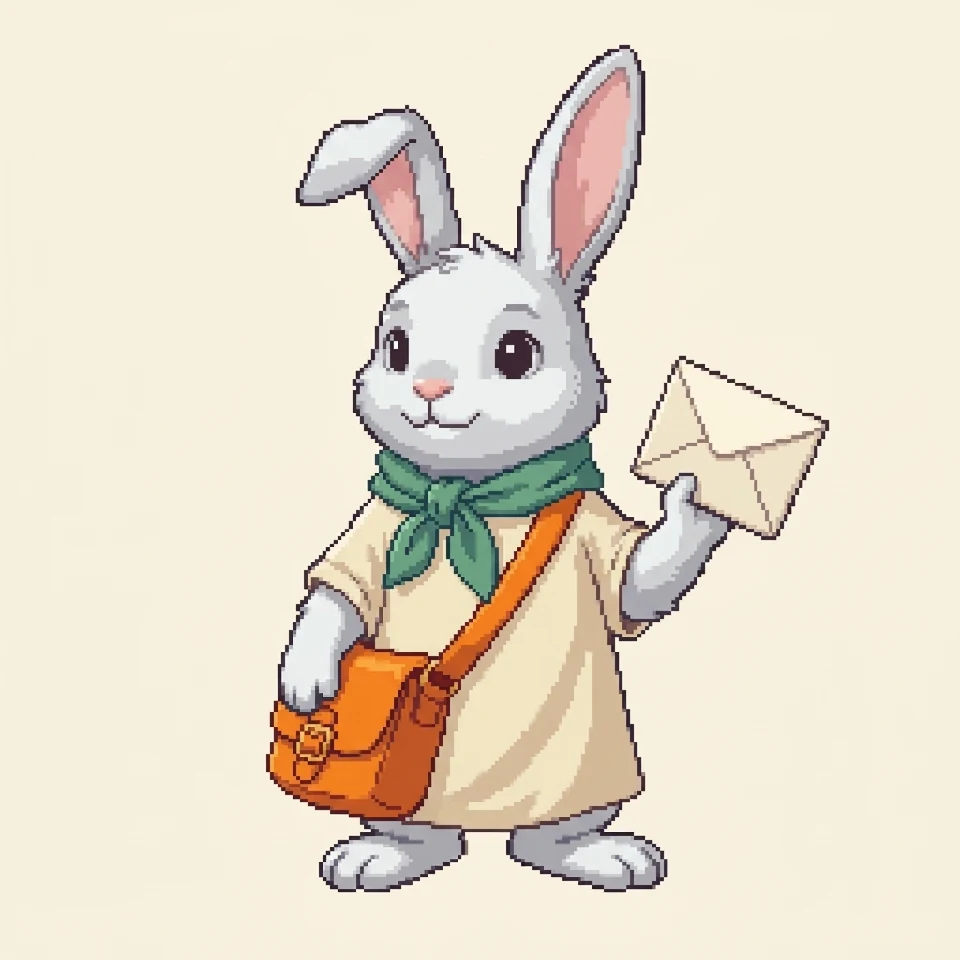 Controlled test: Pixel Art quantizes every curve into a crisp, stair-stepped 16-bit pixel grid.
- What to look for: Deliberate square pixel grid, clean stair-stepped pixel outlines with zero anti-aliasing blur, and a tight indexed palette using 2–3 shading tones per color block.
- Best for: 2D indie games, retro dialogue portraits, and animated sprite sheets.
- Tested English prompt (copy into tool):
Original white rabbit courier character as authentic 16-bit Pixel Art, three-quarter front view, bent right ear, teal-green neck scarf, cream tunic, orange crossbody satchel bag, holding a plain envelope, crisp visible square pixel grid, clean stair-stepped pixel outlines, limited retro color palette, zero anti-aliasing, solid warm off-white background
- Action: Copy prompt → Open AI Character Generator
4. Two Light Workflow Case Studies
Once you pick a cartoon style, the next test is whether that style holds up across multiple angles and scenes. We ran two distinct styles from this comparison through SugarCube's downstream tools using the style image as the starting reference.
Case Study 1: Rubber Hose → Character Sheet
- Starting style: 03. Rubber Hose
- Next step: AI Character Sheet Generator
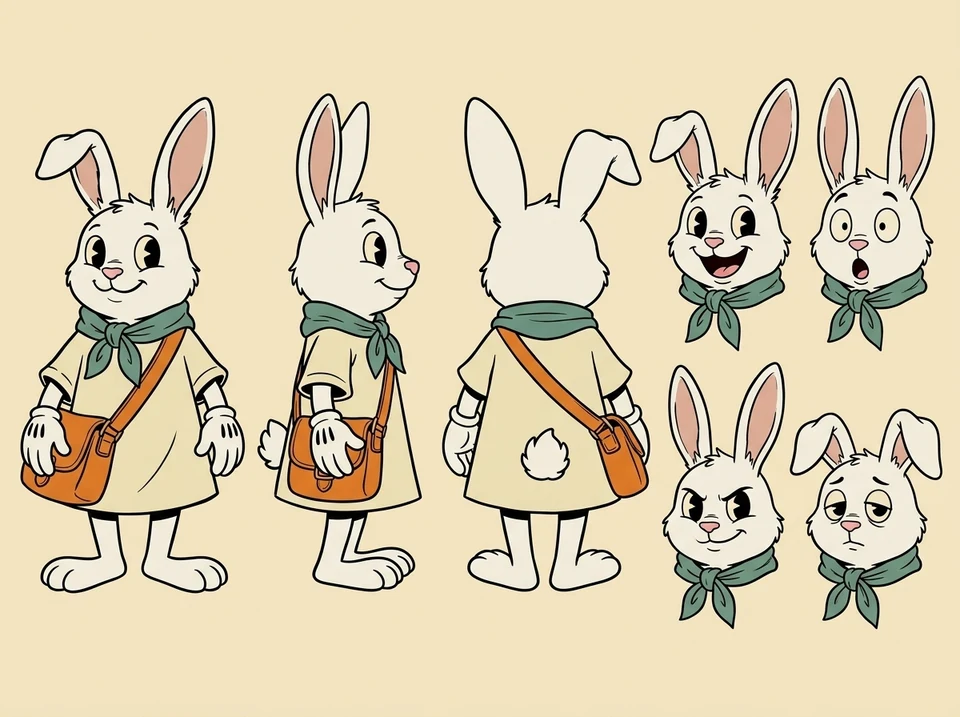
- Key finding: Thick, uniform black ink outlines and high-contrast props (teal scarf, white gloves, orange satchel) translate cleanly across front, side, back, and 2×2 expression views. Watch small asymmetrical details—like which ear bends or which shoulder carries the strap—because they can mirror or shift between turnaround angles and still need a quick manual check.
Case Study 2: Cel-Shaded Anime → 4-Panel Storyboard
- Starting style: 07. Cel-Shaded Anime
- Next step: AI Storyboard Generator
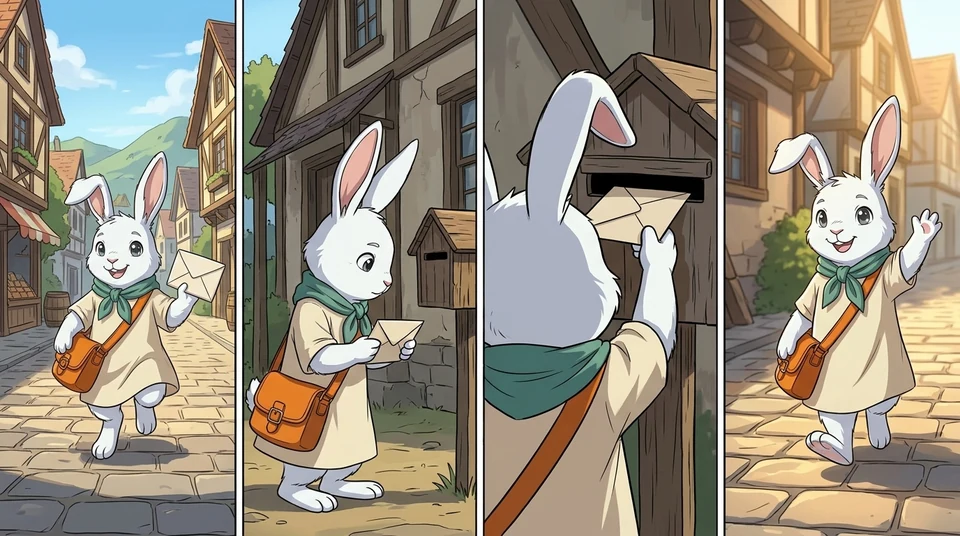
- Key finding: Hard-edge cel shading paired with strong color anchors keeps the rabbit courier recognizable across a wide street shot, medium close-up, and over-the-shoulder angle. Smaller costume details (such as the brass satchel buckle) naturally simplify in wide or back-facing panels, so keep your character's defining colors and silhouette bold rather than relying on tiny accessories.
5. FAQ
How should I pick my first cartoon style?
Match the style to the smallest size your character will appear at. If it needs to read clearly as a 48px avatar or game icon, start with Flat Vector, Chibi, or Pixel Art; save textured styles like Watercolor Cartoon or Comic Book halftones for larger cards, books, or banners.
How do I reduce character drift when generating new poses or scenes?
Lock 2–3 high-contrast visual anchors in every prompt (such as "bent right ear, teal-green neck scarf, orange crossbody satchel") and pass your approved base portrait as a reference image rather than regenerating from text alone.
Can I change styles after designing a character?
Yes. Once your character's silhouette, outfit, and signature props are settled, you can upload the approved character image as a reference into AI Character Generator and swap only the style keywords—just like the 12-way comparison above.
Ready to test a style on your own character?
Создать
See the same original rabbit courier drawn in 12 distinct cartoon styles—from Flat Vector and Rubber Hose to Cel-Shaded Anime, Clay 3D, and Pixel Art—with visual cues and tested prompts.
Открыть генератор персонажей ИИПрактические руководства, творческие идеи и взгляды на создание изображений и видео с ИИ.