

この記事の目次
この記事は英語でお読みいただけます。表示言語:日本語。
A useful AI product campaign answers practical questions: What is the item? What does its surface look like? Where does it fit? Which detail matters? Give each image a job before generating variations.
The reading example is Minimalist Product Photography on Stone in the Nano Banana Pro library, with a YouMind source entry. Its 1200 × 655 result is a four-column composition of different beauty and wellness packages, including bottles and a jar. AURA, LUNA, and SOL appear as example branding. It demonstrates shared art direction across different packages; it is not a same-SKU preservation experiment. The cover is a separate editorial illustration.
1. Define what must stay true
Before choosing props, prepare approved product references and record:
- Silhouette, proportions, and verified measurements where relevant.
- Material, finish, and color.
- Caps, pumps, seams, controls, and openings.
- Exact labels and brand wording.
- Included accessories versus styling props.
A text prompt alone cannot verify packaging or dimensions. The source example has no original SKU references attached, so do not treat its different packages as accurate photographs of a real catalog. If accuracy is essential, consider an approved product photograph with a separately developed setting.
2. Extract a campaign direction
The source prompt offers three variables: product type, surface, and palette. Its defaults are beauty and wellness, stone surfaces, and beige. Natural light and soft greenery connect the composition.
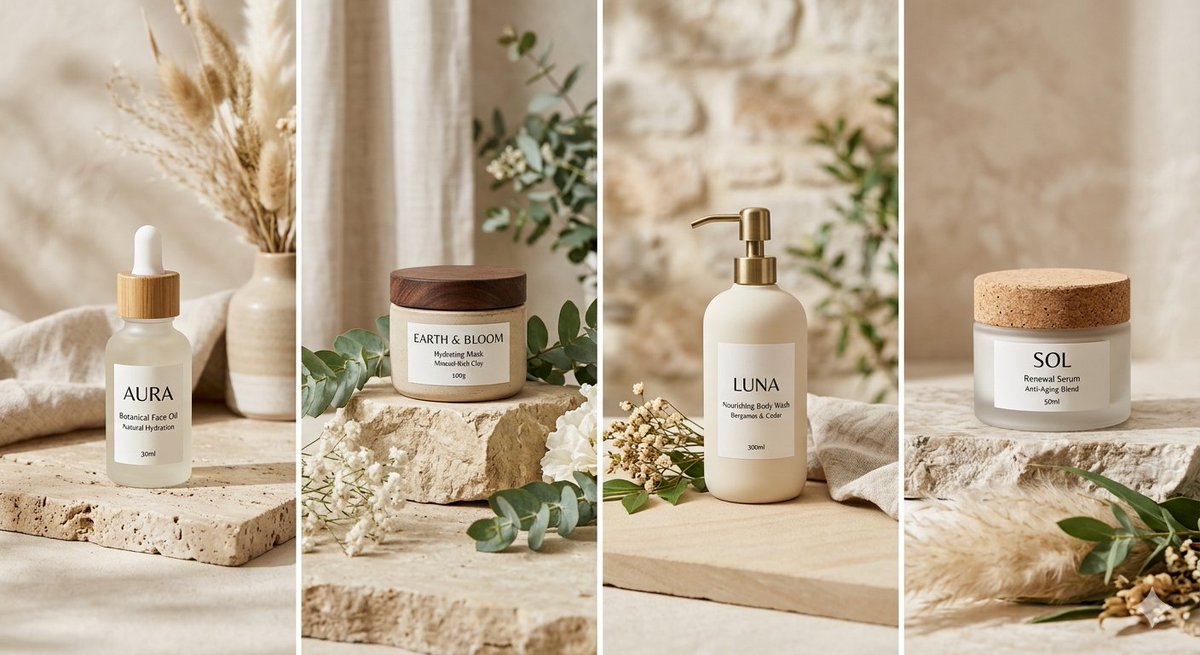
Borrow that structure, not an unverified product identity. A concise direction might be “quiet natural-light product imagery on stone, with restrained greenery and a warm neutral palette.” Choose whether foliage helps explain the product or merely competes with it. The moodboard guide helps resolve those choices before a full set.
The four supplied packages are separate examples of this direction. They cannot establish how one bottle would look from six angles or whether a logo remains exact across generations.
3. Plan six images with different jobs
Image 1: Hero
Show the complete item in a readable three-quarter or front view. Keep important edges inside the crop. Check the result as a small thumbnail before refining props.
Image 2: Material
Use a closer view to explain the intended finish. A matte container should not silently become glossy. Keep enough outline visible to connect the detail to the hero.
Image 3: Scale
Place the product beside a familiar object only when their relative dimensions can be checked. A generated scene is context, not a measurement. Put verified dimensions in deliberate typesetting.
Image 4: Lifestyle context
Show where the item belongs while keeping it prominent. Props must not imply included accessories or unsupported uses. A coordinated background is useful only if the product remains understandable.
Image 5: Design detail
Focus on one important feature such as the cap or pump. Compare the join, opening, and mechanism against the approved reference. Do not hide construction behind excessive shallow focus.
Image 6: Closing composition
Return to the campaign palette with space for a headline added later. Keep exact copy outside the generation task when it needs precise spelling and typography.
This is an editorial coverage plan. The library example supplies four different packages, not these six finished photographs. Publish only the views the audience needs.
4. Use a reusable brief
The following is an editorial adaptation of the source’s product/surface/palette structure, not its verbatim prompt or a tested result:
Create a campaign concept for the product in my approved reference.
Preserve the visible silhouette, finish, cap or pump, and label placement.
Use a pale stone surface, soft natural side light, restrained greenery,
and a warm beige palette. Styling props remain secondary.
Current frame: a complete hero view with breathing room around the product.
Keep a calm area for exact copy added later. Do not invent labels or features.
Replace the current-frame line for material, detail, or closing views. Record the actual model and exposed settings. Instructions to preserve a feature are review targets, not a guarantee that the output preserved it.
5. Review accuracy before atmosphere
Compare the result with the reference side by side. Check outline, cap, label, finish, proportions, and included parts. Read every word separately. If a revision changes product identity, reject it even if the background is more attractive.
Then view the campaign together at its destination size. Does each image add information? Is the product color stable? Does the hero remain clear on a phone? Use the publishing checklist before export.
Start with one useful frame
Open the AI Product Photo Generator with an approved reference and the first image’s job. Review that frame before expanding. For a narrative campaign, use the storyboard guide to connect shot roles.
Source note: the linked YouMind OpenLab libraries preserve the original prompts and provenance. The planning exercises and review observations here are editorial analysis, not generation tests.
作成
Plan six AI product photos with distinct jobs: hero, material, scale, context, detail, and closing. Learn what a four-package art-direction example can show.
商品画像を作成AI による画像・動画制作の実践的なガイド、アイデア、視点をお届けします。
こちらの記事もおすすめ
次の作品につながる、さらなるアイデア。

How to Plan a Consistent AI Storyboard in 8 Panels
Plan an AI storyboard with an eight-panel lemon-drink example, a visual bible, shot roles, and continuity checks. Separate a storyboard image from a video.
An AI Image and Video Quality Checklist Before Publishing
Review AI images and video before publishing. Check composition, product accuracy, text, motion, and exports, with a real poster constraint counterexample.
Welcome to the SugarCube Journal
Explore practical guides to AI image prompts, moodboards, storyboards, product photos, video workflows, and reviewing visuals before publishing.