

Auf dieser Seite
Dieser Artikel ist auf Englisch verfügbar. Sprache der Benutzeroberfläche: Deutsch.
The best AI kiss video generator for your project depends first on your photos: one image containing both people, or two separate portraits. Next, check the selected output, the cost of an actual clip, and whether you can review and download it. A free-credit offer alone does not answer those questions.
For two consenting adults with separate portraits, the SugarCube AI Kiss Video Generator provides two upload slots and a credit quote before generation. AIReel offers a choice of kiss scenes; LitVideo emphasizes preset styles; Vidu presents a prompt-guided workflow. The comparison below explains what each official page establishes and what still needs checking.
Evidence note — checked October 23, 2026: this is a review of public product documentation and SugarCube's current interface and configuration. We did not run paid generations or conduct a side-by-side output test. We cannot name a winner for facial likeness, motion quality or reliability. SugarCube publishes this guide and operates one of the tools compared.
One couple photo or two portraits?
A couple photo already places both people in one frame, with an existing relationship between their positions, scale and lighting. An image-to-video tool can use that composition as its starting point. Check that it supports a kiss scene; accepting an image does not establish that it offers a dedicated kissing effect.
Two separate portraits introduce more choices: where each person stands, their relative size, the background and the direction of the light. An AI kiss generator from two photos needs an input mode that accepts both identities. A second image slot might instead mean an ending frame, so read its label before uploading.
SugarCube's dedicated kiss page asks for Person A and Person B separately. You do not need to make a collage first. This is an input convenience, not a guarantee that the resulting faces, poses or contact will be accurate. It also does not automatically verify anyone's age or permission.
| Your starting material | What to check | Practical next step |
|---|---|---|
| One photo with both adults | Whether the tool accepts a couple photo and preserves the intended framing | Choose an effect or image-to-video mode that explicitly supports that input |
| Two solo adult portraits | Whether the inputs represent two people rather than start/end frames | Use a documented two-portrait workflow |
| Portraits with very different angles or lighting | Whether both faces remain readable before animation | Choose a more compatible pair before spending credits |
Compare four AI kiss video workflows
These are options by workflow, not a quality ranking. “Not specified” means the cited public page did not establish an exact value; it does not mean the feature is absent. Credits are platform-specific and cannot be compared as if they were the same currency.
On a phone, swipe the table sideways to read the output and cost columns.
| Tool and official source | Input described | Output described | Credits and limits to check | Useful when |
|---|---|---|---|---|
| SugarCube AI Kiss | Exactly two adult portraits; JPG/PNG/WebP, 8 MB each | 720p, 5 seconds on the published page | Live quote; 100 introductory credits do not cover this clip | Separate portrait slots and an upfront quote |
| AIReel AI Kiss | One photo or two separate photos | Downloadable video; exact specifications not listed | Free credits advertised; allowance and features vary by plan | Ready-made kiss scenes |
| LitVideo AI Kissing | Image(s); JPG, PNG and JPEG listed | Kiss animation; exact specifications not listed | Free downloads may be watermarked; premium removes watermark | Choosing a preset style |
| Vidu AI Kissing | Approved photos and a scene prompt; exact count not listed | Review and export; exact specifications not listed | Per-clip cost and free allowance not established on tool page | Describing mood and framing |
SugarCube: two portraits and a quote before generation
The dedicated page uses PixVerse V6 with a preset gentle kiss instruction. It is a focused flow: add the two portraits, review the output and quote, and confirm consent. You do not write a custom prompt on this page.
The published page describes a 720p, five-second clip. That is the specific offer compared here, not a claim about the entire model's limits. The output and quote shown in the live tool take precedence if they change. Do not infer a price from a model's general specification.
AIReel: choose a scene first
AIReel's official tool page describes both one-photo and two-photo inputs, with scenes including wedding, forehead and cheek kisses. It also advertises free credits while qualifying them by plan. Check the chosen scene's requirements, output settings and remaining credits before generating; the public page does not supply an exact per-clip comparison price.
LitVideo: preset styles and a watermark check
LitVideo's official page describes uploading images, selecting a kissing style, then previewing and downloading. It presents romantic, wedding, meme and cartoon-style directions. Its FAQ says free downloads may carry a watermark and premium plans can remove it. That distinction matters if you need a clean export; it does not establish that every generation is free.
Vidu: describe and review a scene
Vidu's official kissing page organizes the process around approved photos, a scene description, and review before export. It may suit a creator who wants to specify mood and framing. Confirm the exact input mode and output cost inside the workspace: the public page does not establish a dedicated two-slot specification or a fixed clip price.
What “PixVerse V6 AI kiss” tells you
The model name and the product workflow answer different questions. PixVerse's official V6 page describes general text-to-video and image-to-video creation, including 15-second 1080p generation, native audio and aspect-ratio controls. Those model-level capabilities do not establish the settings, audio, price or free allowance of every product using V6.
For a PixVerse V6 AI kiss on SugarCube, inspect the dedicated AI kiss workspace. Its two-person input, preset instruction and displayed quote define that particular workflow. A model name alone is not evidence of better lip alignment or a guaranteed likeness.
Make a two-photo kiss video on SugarCube in three steps
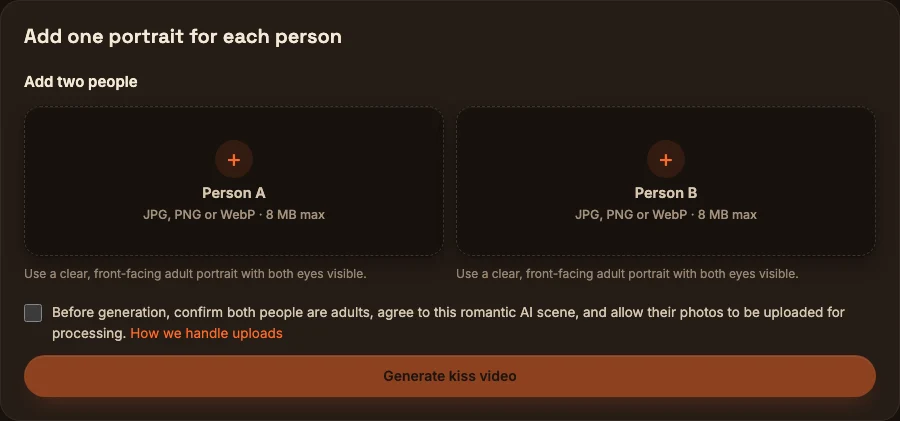
Interface screenshot captured October 23, 2026. No portraits were uploaded and no video was generated. This shows the input workflow, not an example output.
- Add two permitted adult portraits. Open the AI Kiss Video Generator. Add one clear portrait for Person A and one for Person B, in JPG, PNG or WebP, up to 8 MB each. Both people must be adults and agree to this romantic AI scene and to uploading their photos for processing.
- Review the quote and confirm consent. Inspect the stated output and credit cost; the published page describes 720p and five seconds. Confirm the adult-consent statement yourself; a checkbox is not independent identity or age verification. If the balance is insufficient, review SugarCube pricing before purchasing credits.
- Generate, review and download. Once you choose to generate, follow the task status on the page. Play the complete result and inspect both faces, the approach and the contact before downloading. A completed AI video may still need to be discarded if it misrepresents either person.
Your submitted media is processed in the cloud. Obtain permission before uploading; do not treat the tool as an offline editor. Review the site's privacy policy and terms, available in the footer, before submitting personal photos. Agree on sharing the finished synthetic clip separately from permission to upload it.
Free credits: what they cover and what they do not
If you searched for a free AI kissing video maker online, distinguish a signup offer from a free completed export. Check four things: eligibility, expiry, the selected clip's quote, and any download watermark or plan restriction.
On SugarCube, eligible new users can receive 100 introductory credits after registration and sign-in, valid for three days. These are shared across tools. New guest visits receive no introductory credits by default. The current default 720p, five-second kiss clip costs more than the 100-credit grant, so that offer does not cover the default video by itself.
Eligibility is limited by both browser identity and IP history; creating another account or clearing storage does not create another entitlement. Check the account's actual balance and the tool's current quote. Pricing and eligibility can change, so this guide does not convert credits into a promised cash price or claim a percentage saving.
If a task reports a failure or a result cannot be opened, read its status and recovery action before starting again. A storage or delivery issue is different from a rejected generation. Do not assume every delay, unwanted result or download problem triggers an automatic cash or credit refund.
Prepare photos and inspect distortion
These are practical preparation suggestions, not measured success rates:
- Use comparable framing. Two head-and-shoulders portraits are easier to reason about than a tight face crop paired with a distant full-body shot. Leave space around the face.
- Prefer compatible light. A harsh side-lit face and a flat studio portrait can make the shared scene look inconsistent. Start with photos whose lighting is already reasonably similar.
- Keep eyes and mouths visible. Sunglasses, hands, hair across the lips and motion blur remove information the animation needs to interpret.
- Avoid extreme angle differences. A near-frontal pair or similar three-quarter views is a more controlled starting choice than mixing a straight-on face with an extreme profile.
- Review the whole clip. Look for changing face shape, merged mouths, drifting teeth, disappearing glasses, unexpected hands and abrupt movement. Check the frames just before and after contact as well as the final frame.
Simplify the requested motion or choose a different permitted photo pair if the result is uncomfortable. Sharpening or upscaling will not reliably repair invented anatomy. The AI work publishing checklist can help organize a final review.
Three gentle motion prompts to copy
These are untested editorial starting points for a tool that accepts custom prompts. SugarCube's dedicated kiss page uses its own preset and does not offer a custom-prompt field. Copying these blocks does not submit a task or transfer them to that page.
A quiet anniversary greeting
Use the approved portraits of the two consenting adults.
They turn gently toward each other and share one brief,
closed-mouth kiss. Keep the camera still and the movement small.
Preserve their recognizable features and existing clothing.
No extra people, dialogue, text or scene changes.
A soft cheek kiss
The two consenting adults stand comfortably side by side.
One gives the other a brief, gentle kiss on the cheek,
then both relax into a small smile. Use a steady medium close shot.
Keep faces readable and avoid hands covering either face.
No cuts, dramatic head turns or added text.
An original fictional romance scene
Animate these two original adult fictional characters.
They lean slightly toward each other, share a brief closed-mouth
kiss, then pause. Keep the existing character designs and outfits.
Use a fixed camera, soft light and restrained movement.
No additional characters or scene transitions.
For fictional work, first prepare original adult characters with the AI Character Generator. A prompt requests behavior; it cannot guarantee an exact face, motion or result.
Frequently asked questions
Which AI kiss video generator is best for two separate photos?
Choose one that explicitly treats the uploads as two people and shows the selected clip's cost. SugarCube documents exactly two portrait inputs, while AIReel describes both one-photo and two-photo scenes. This guide did not test their generated outputs, so it cannot identify a universal quality winner.
Can I upload a single couple photo to SugarCube's kiss page?
The dedicated SugarCube kiss workflow currently requires exactly two portrait references. It is not a one-couple-photo input mode. Check the input requirements of a different tool if you want to animate one existing shared photo.
Does 100 free credits mean a free 720p kiss video?
No. SugarCube's default five-second, 720p clip exceeds the 100-credit introductory grant. The grant is subject to eligibility and a three-day expiry; review the live quote and your balance before starting.
Can I change the kiss prompt on SugarCube?
The dedicated kiss page uses a preset prompt for the published 720p, five-second workflow. Use a workspace that explicitly accepts custom prompts if you need different action directions; check its photo input requirements separately.
Can I make an AI hug with the same page?
The dedicated SugarCube page is a kiss workflow. This guide does not establish an available SugarCube AI Hug product. Do not assume a different effect is supported simply because it also involves two photos.
Is a convincing result evidence of a real moment?
No. It is synthetic media. Use photos only with the adults' informed permission and make that context clear when sharing. If either person objects to the result, do not publish it.
Choose the input workflow before spending credits
Start with the photos and the intended scene, then check output settings, the full quote and export conditions. For two separate permitted adult portraits, open SugarCube's AI Kiss Video Generator to inspect the current inputs and quote. For more direction over a fictional scene, compare the prompt-led options above before choosing a workflow.
Sources and scope
Official pages were checked on October 23, 2026. Product descriptions are provider documentation, not independent proof of output quality:
- SugarCube AI Kiss Video Generator: published input flow, stated output, quote and consent requirements. Model-level options are not assumed to be selectable on this dedicated page.
- SugarCube pricing: current purchase choices; actual clip cost remains the quote in the tool.
- AIReel AI Kissing Generator: photo modes, scene examples and qualified free-credit statement.
- LitVideo AI Kissing Generator: image uploads, preset workflow and watermark qualification.
- Vidu AI Kissing Generator: approved-photo, prompt and review/export workflow.
- PixVerse V6: general model capabilities, separate from each site's preset.
No paid generation, output benchmark or payment was performed for this guide. The screenshots show an empty interface; the copyable prompts are editorial suggestions, not reproduced test results.
Erstellen
Compare four AI kiss video workflows, one-photo vs two-photo inputs, output limits and credit costs. Start with consent, then choose a tool that fits your photos.
KI-Kussvideo erstellenPraktische Anleitungen, kreative Ideen und Perspektiven zur Bild- und Videogestaltung mit KI.
Das könnte dir auch gefallen
Noch ein paar Ideen für dein nächstes Projekt.
Plan 6 AI Product Photos That Work as a Campaign
Plan six AI product photos with distinct jobs: hero, material, scale, context, detail, and closing. Learn what a four-package art-direction example can show.

An AI Image and Video Quality Checklist Before Publishing
Review AI images and video before publishing. Check composition, product accuracy, text, motion, and exports, with a real poster constraint counterexample.
Welcome to the SugarCube Journal
Explore practical guides to AI image prompts, moodboards, storyboards, product photos, video workflows, and reviewing visuals before publishing.