
On this page
Open the model picker in SugarCube and you will see five active ByteDance Seedream entries side by side: Seedream 5.5, Seedream 5.0 Pro, Seedream 5.0 Flash, Seedream 5.0 Lite, and Seedream 4.5. Because ByteDance shipped three 5.0 variants before 5.5, picking the right one is less obvious than it looks.
Below is how the five models actually differ in practice, what our side-by-side prompt tests showed (including where small details slipped), and what options and credit costs each version uses inside SugarCube.
Quick Summary
- Seedream 5.5 is the everyday default for photo-realistic products, portraits, multi-step edits (ByteDance reports consistency up to 100 consecutive turns), and native transparent PNGs.
- Seedream 5.0 Pro is best when structure comes first: menus, posters, multi-column infographics, and multilingual copy.
- Seedream 5.0 Flash is the fastest, lowest-cost option in the lineup (a flat 40 credits per run in SugarCube regardless of size or references) for quick drafts and punchy social graphics.
- Seedream 5.0 Lite (often shortened to "Seedream 5") handles ambiguous or multi-step prompts well and accepts up to 14 reference images in SugarCube.
- Seedream 4.5 is still worth picking for classic 2D anime and cel-shaded illustration, and supports native 4K upstream.
Why Are There Three "Seedream 5" Models?
Seedream, built by ByteDance Seed, handles text-to-image generation and instruction-based editing in one model family rather than splitting them into separate generators and editors. You can start from text alone or feed in reference photos and ask for changes in plain English.
The naming confuses people because "Seedream 5" and "Seedream 5.0" are the same generation, split into three releases with different jobs: 5.0 Lite, 5.0 Pro, and 5.0 Flash. Whenever a tool or API lists plain "Seedream 5" without a suffix (seedream-5-0), it almost always points to Seedream 5.0 Lite, the first 5.0 release.
Release Timeline
- September 2025 (Seedream 4.0): Combined text generation and image editing in one architecture and introduced 4K output.
- December 2025 (Seedream 4.5): Improved multi-reference subject hold, poster layouts, and small text legibility.
- February 2026 (Seedream 5.0 Lite): Opened the 5.0 generation with stronger visual reasoning for short or under-specified prompts.
- July 2026 (Seedream 5.0 Pro): Added layout-first planning for infographics, charts, and multilingual posters.
- September 2026 (Seedream 5.0 Flash): Shipped as a faster, lower-cost 5.0 variant with punchier contrast and stronger reference color match.
- November 2026 (Seedream 5.5): Added native transparent PNG support, lower small-text error rates, and much tighter identity preservation across long edit chains.
Five Seedream Versions Side by Side
Note on sizes: ByteDance’s upstream specs go up to 3K on 5.0 Lite and 4K on 4.5. Inside SugarCube’s workspace controls, the Quality menu currently exposes 1K / 1.5K / 2K (or 1K / 2K), with exact credit quotes shown before you submit.
| Model | Released | Strongest Use Case | Sizes in SugarCube | Max References | Credit Cost in SugarCube |
|---|---|---|---|---|---|
| Seedream 5.5 | Nov 2026 | Multi-round edits, transparent PNGs, realistic products & skin, small labels | 1K, 1.5K, 2K | 10 | 40 (1K/1.5K) or 60 (2K) text-only; adds per-reference cost |
| Seedream 5.0 Pro | Jul 2026 | Posters, menus, multi-column infographics, 16+ language layouts | 1K, 2K (no 2K on 16:9 / 9:16) | 10 | 70 (1K) or 140 (2K) text-only; adds per-reference cost |
| Seedream 5.0 Flash | Sep 2026 | Fast drafts, social graphics, vibrant reference color retention | 1K, 1.5K, 2K | 10 | Flat 40 across sizes and references |
| Seedream 5.0 Lite | Feb 2026 | Complex prompt reasoning, diagrams, large multi-reference composites | 1K, 2K (3K upstream) | 14 | Flat 60 across sizes and references |
| Seedream 4.5 | Dec 2025 | Classic 2D anime, cel-shaded art, existing 4.5 prompt workflows | 1K, 2K (4K upstream) | 10 | Flat 70 across sizes and references |
Seedream 5.5: Built for Iterative Editing and Clean Cutouts
Released in November 2026, Seedream 5.5 fixes the biggest annoyance in earlier image editors: faces, clothing folds, and rooms slowly drifting after three or four consecutive edits. In practice, it works well when you treat generation like a normal retouching session rather than trying to nail everything in one prompt.
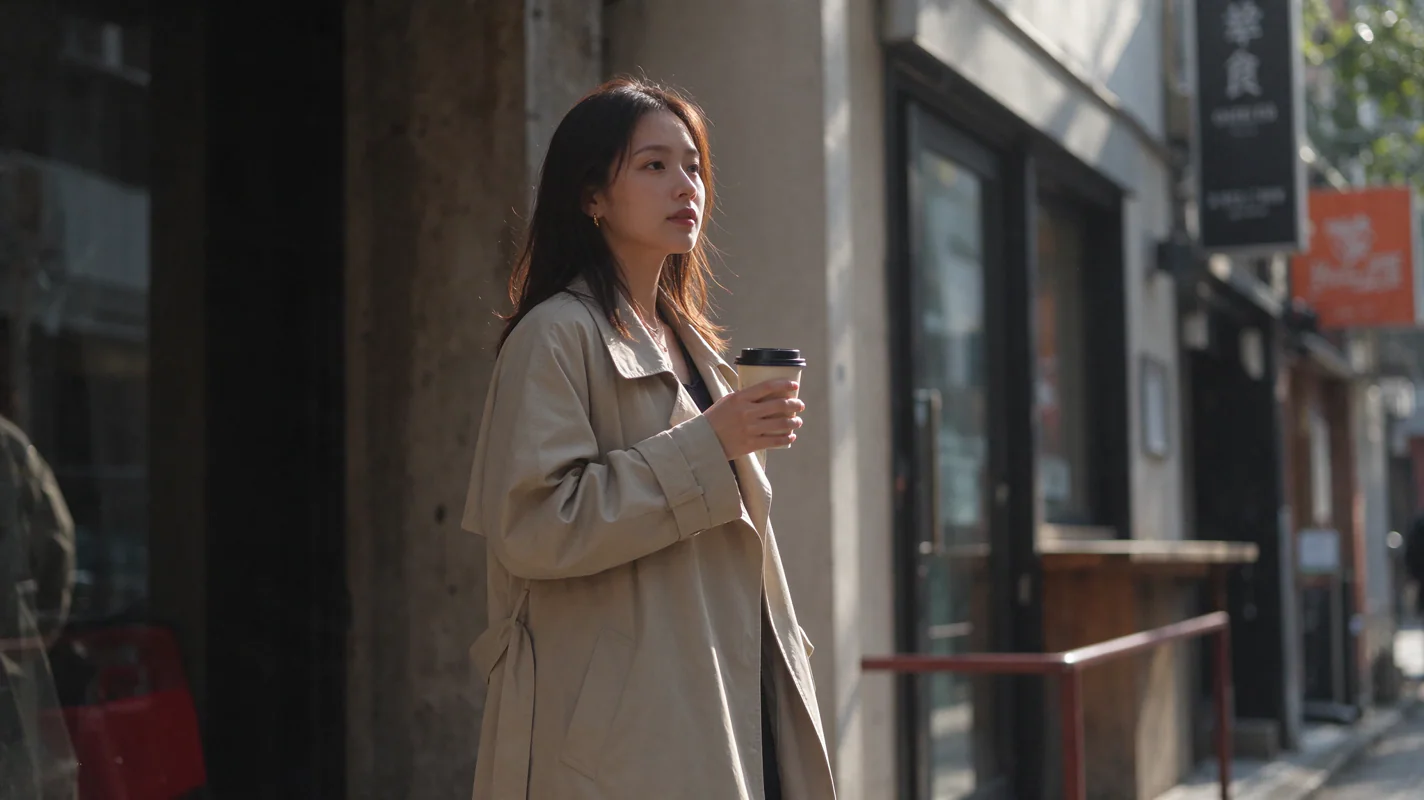
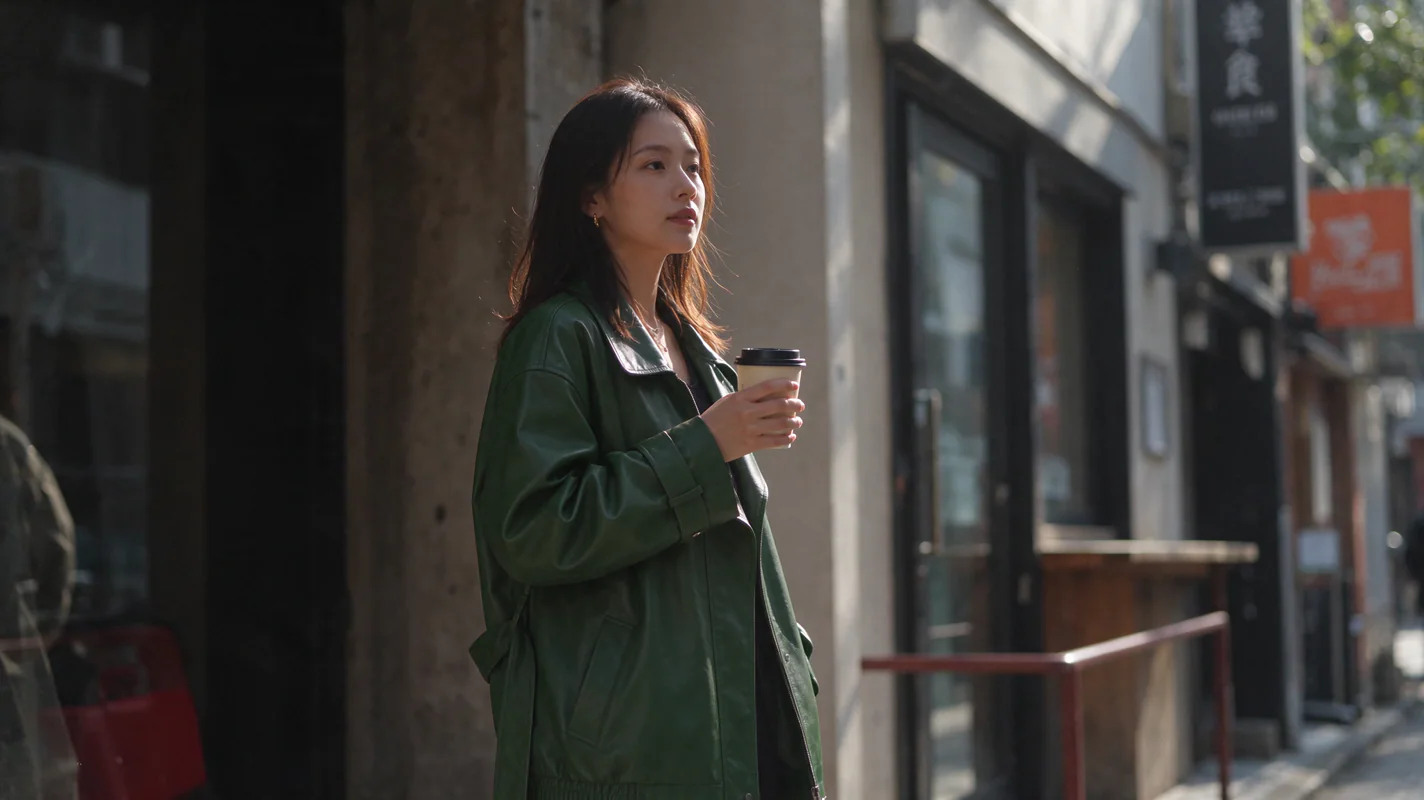
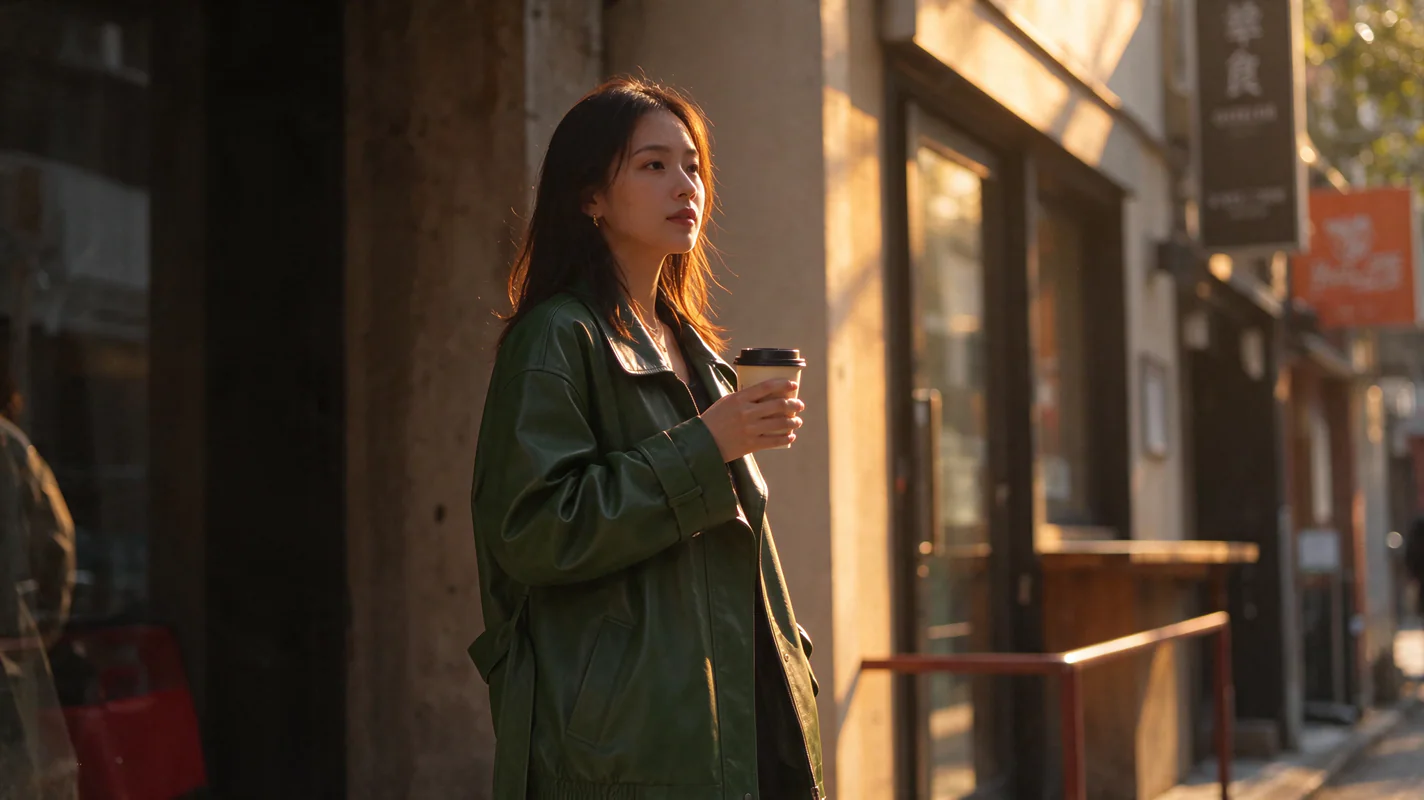
- Holding edits across long chains: ByteDance’s benchmarks report consistency across up to 100 sequential turns. In real usage, swapping a coat color and then shifting the afternoon light keeps the person’s face, hand grip, coffee cup, and street storefront steady.
| 1 · Original beige coat | 2 · Green leather jacket swap | 3 · Warm golden-hour relight |
|---|---|---|
 |
 |
 |
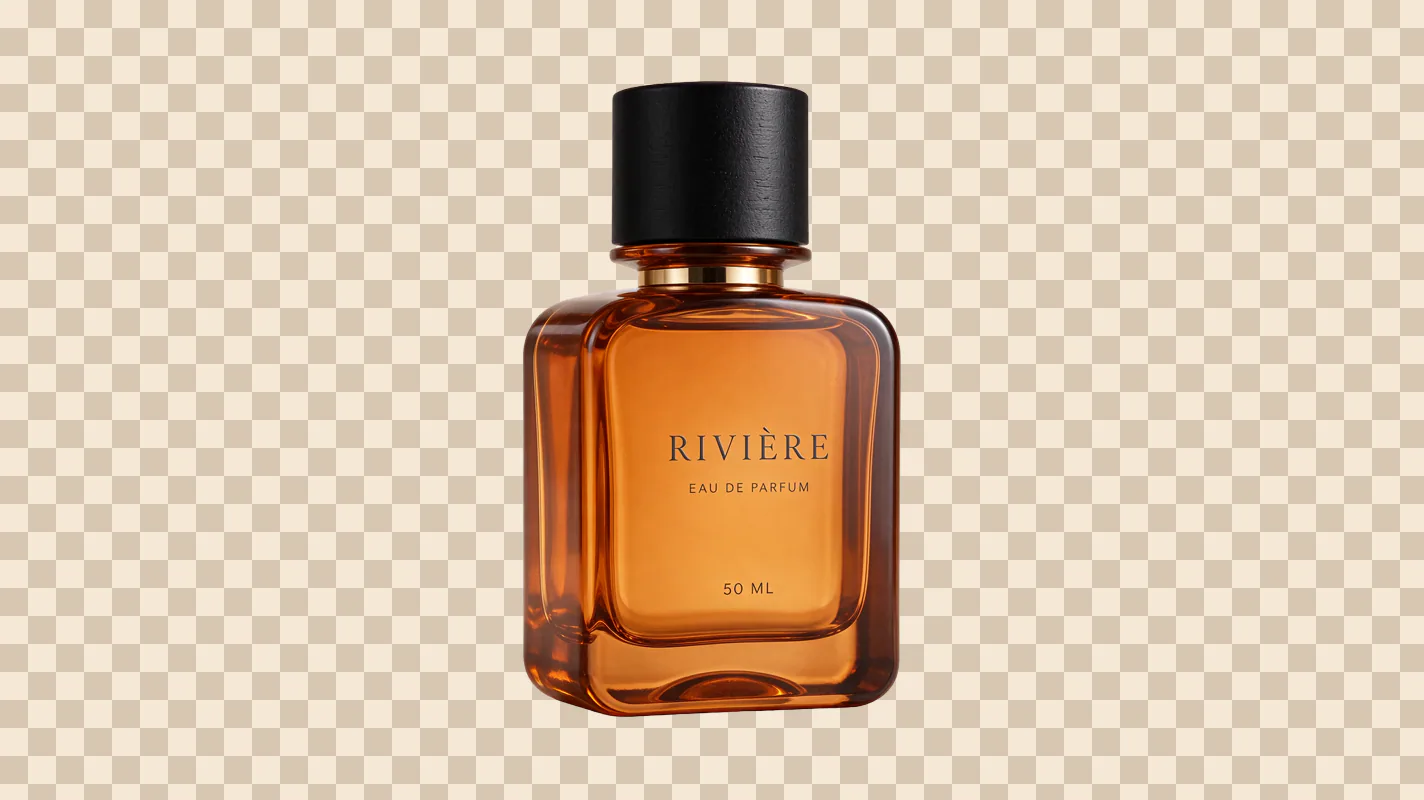
- Native transparent backgrounds: In SugarCube, Seedream 5.5 exposes a Transparent background mode (
Auto,Transparent, orOpaque, exported as PNG). Glassware, stickers, and isolated packshots render straight onto an alpha channel without jagged manual cutouts.
- Dependable tiny text: In ByteDance’s bilingual benchmarks, Seedream 5.5 dropped serious text errors to 0.4% and minor character errors to 1.7%, which makes a noticeable difference on skincare labels, packaging mockups, and menu lines.
- Less plastic sheen: Compared with 5.0 Pro, Seedream 5.5 tones down glossy studio highlights so skin texture, brushed metal, and matte fabrics look closer to natural photography.
- Layer separation when you need editable parts: On SugarCube, Seedream 5.5 also powers the standalone Layer Decomposition tool, which splits a finished graphic into a background and separate transparent PNG layers.
Seedream 5.0 Pro: Layout Planning and Structured Copy
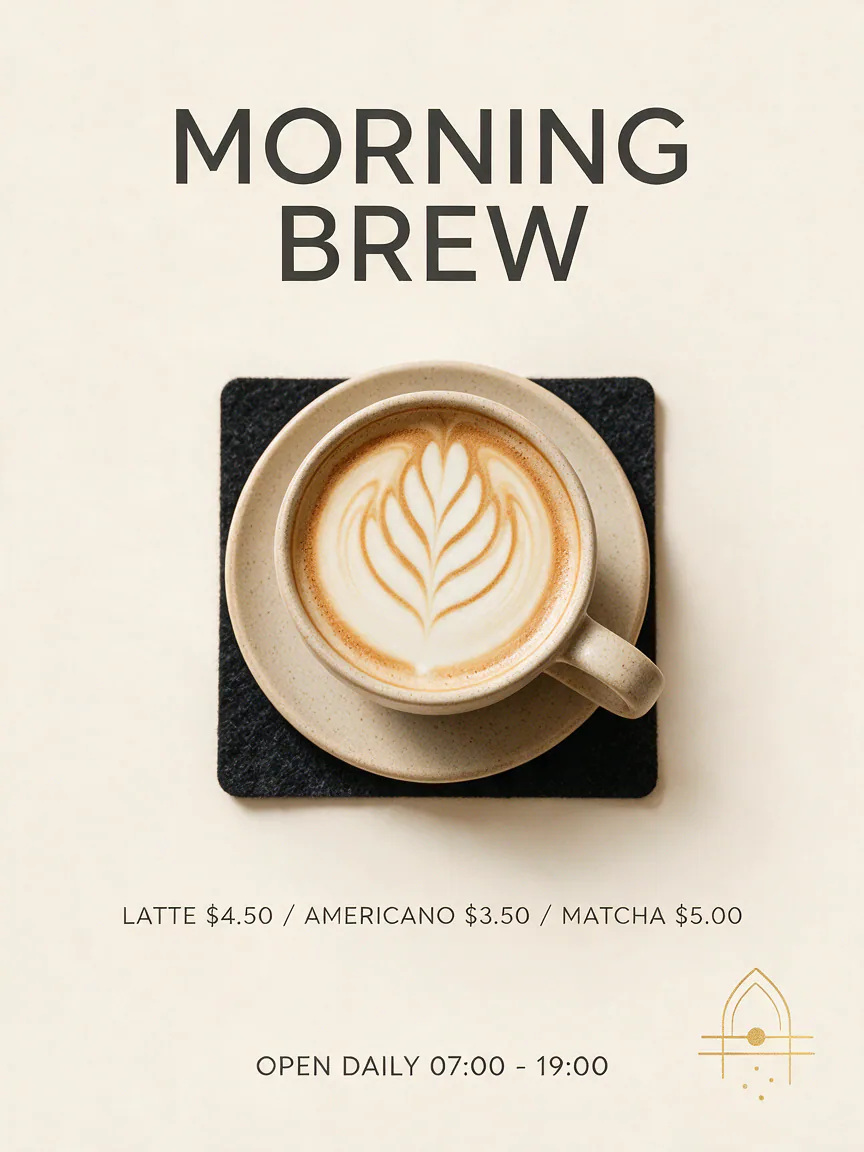
Where Seedream 5.5 shines at photographic realism and editing continuity, Seedream 5.0 Pro thinks like a graphic designer first. Before filling in textures, it maps out margins, columns, text hierarchy, and negative space.
When you feed it a cafe menu, pricing tiers, or an event flyer, it organizes headings, item lists, and small icons cleanly in a single pass instead of cramming words onto random corners. It also handles structured typography across 16+ languages, including English, Chinese, Japanese, Korean, Arabic, Spanish, French, German, and Thai.
Two practical caveats in SugarCube:
- Seedream 5.0 Pro is the highest-credit model in the family (
70credits at 1K and140at 2K before references), and2Kis disabled for16:9and9:16ratios. - For very dense body text or small packaging labels, drafting your layout with 5.0 Pro and running a final pass in Seedream 5.5 often yields cleaner letterforms for fewer credits.
Seedream 5.0 Flash vs. Seedream 5.0 Lite: Which Lower-Cost Model?
If you need lots of variations without spending 70–140 credits per click, the two lighter 5.0 models take very different approaches.
Pick Seedream 5.0 Flash for Speed and Flat 40-Credit Batches
Seedream 5.0 Flash (September 2026) is the fast sibling to 5.0 Pro. It leans toward punchier contrast, bold display typography, and faithful color palettes from reference images without drifting gray or muddy. Best of all in SugarCube, it costs a flat 40 credits at 1K, 1.5K, and 2K, even with reference images attached, making it ideal for exploring compositions before polishing a keeper in Seedream 5.5.
Pick Seedream 5.0 Lite for Prompt Reasoning and 14 References
Seedream 5.0 Lite (February 2026) focuses on visual chain-of-thought reasoning. When your prompt is short, slightly ambiguous, or describes cause-and-effect relationships in a diagram, it fills in missing visual logic better than older models. It also accepts up to 14 reference images in SugarCube (more than any other Seedream model), at a flat 60 credits with no per-reference surcharge.
Is Seedream 4.5 Still Worth Choosing?
Usually no for everyday photography or dense text, where the 5.x series clearly pulls ahead. Still, Seedream 4.5 holds onto two real niches:
- Classic 2D anime and cel-shaded art: Seedream 5.5 tends to nudge stylized anime toward semi-realistic 2.5D lighting and glossy reflections. Seedream 4.5 preserves flatter cel-shading, traditional ink linework, and classic anime proportions cleanly.
- Existing prompt libraries and 4K lineage: If you already rely on tested prompts from our Seedream 4.5 Prompt Library, 4.5 keeps that exact look. (Upstream, 4.5 also supports native 4K; in SugarCube’s current selector it offers
1Kand2K, and you can double dimensions locally in the browser with Upscale Image Online.)
Seedream 5.5 vs. Seedream 5.0 Pro: How to Decide
| Comparison Point | Seedream 5.5 | Seedream 5.0 Pro | Better Pick |
|---|---|---|---|
| Multi-round edit continuity | Built for long sequential edits (up to 100 turns) | Starts drifting after heavy multi-turn edits | Seedream 5.5 |
| Transparent PNG output | Native Transparent background option |
Opaque background only | Seedream 5.5 |
| Posters, menus & infographics | Good, stronger on photos than dense grids | Purpose-built layout hierarchy and margins | Seedream 5.0 Pro |
| Tiny label & packaging copy | 0.4% serious text error rate in ByteDance tests | Strong, slightly higher micro-text drift | Seedream 5.5 |
| Skin & product material feel | Natural matte textures, controlled highlights | Higher contrast and commercial sheen | Seedream 5.5 |
| SugarCube credits (text / 1 ref) | 40–60 credits (text) · 50–80 credits (1 ref) | 70–140 credits (text) · 80–140 credits (1 ref) | Seedream 5.5 |
In short: make Seedream 5.5 your everyday default for product shots, portraits, transparent assets, and iterative edits. Switch to Seedream 5.0 Pro when the entire frame is a designed graphic like a menu, pricing sheet, or multi-section infographic.
Same Prompt, Different Models: Real Output Comparison
To test what actually changes when you swap models without changing a word, we ran two identical prompts in SugarCube.
Test 1: Product Photography + Small Label Text
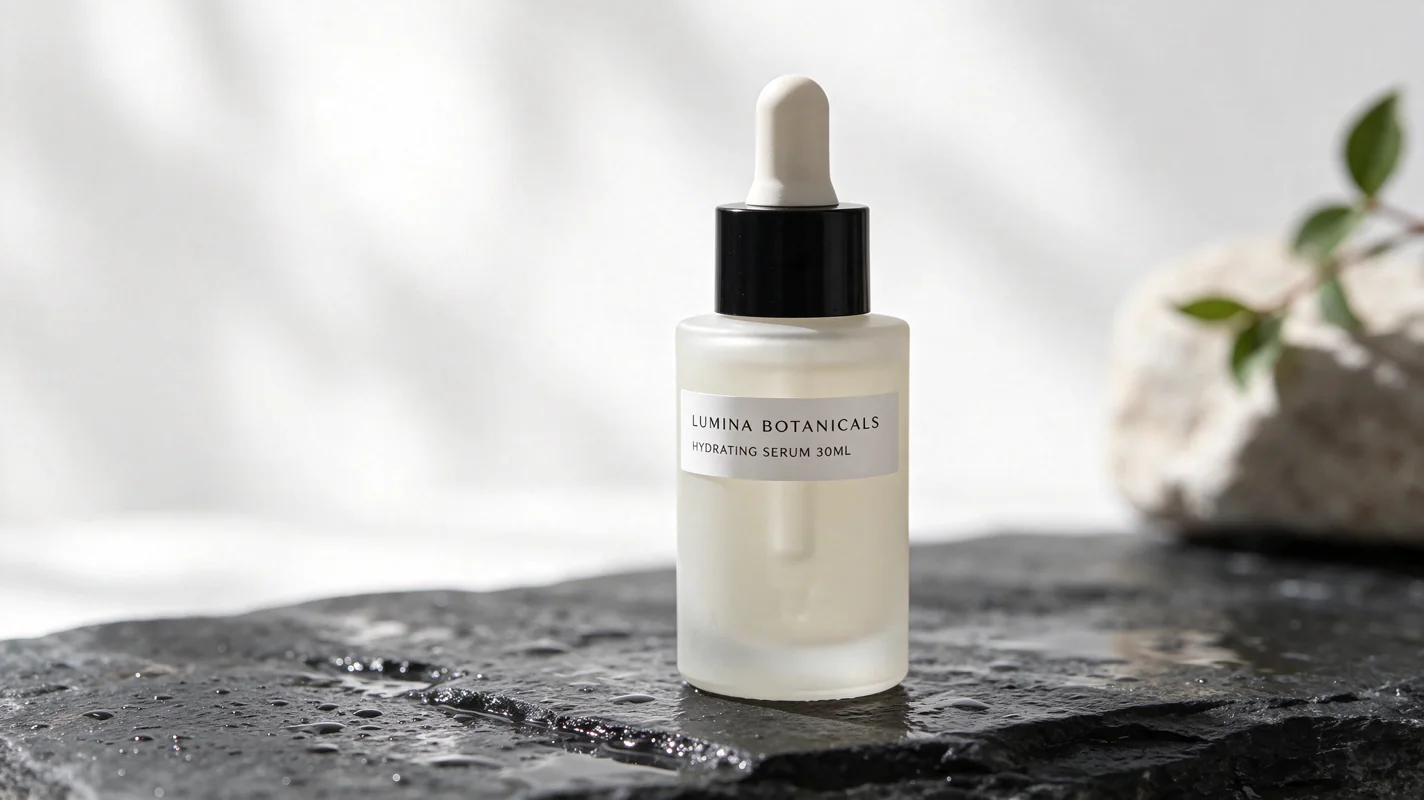
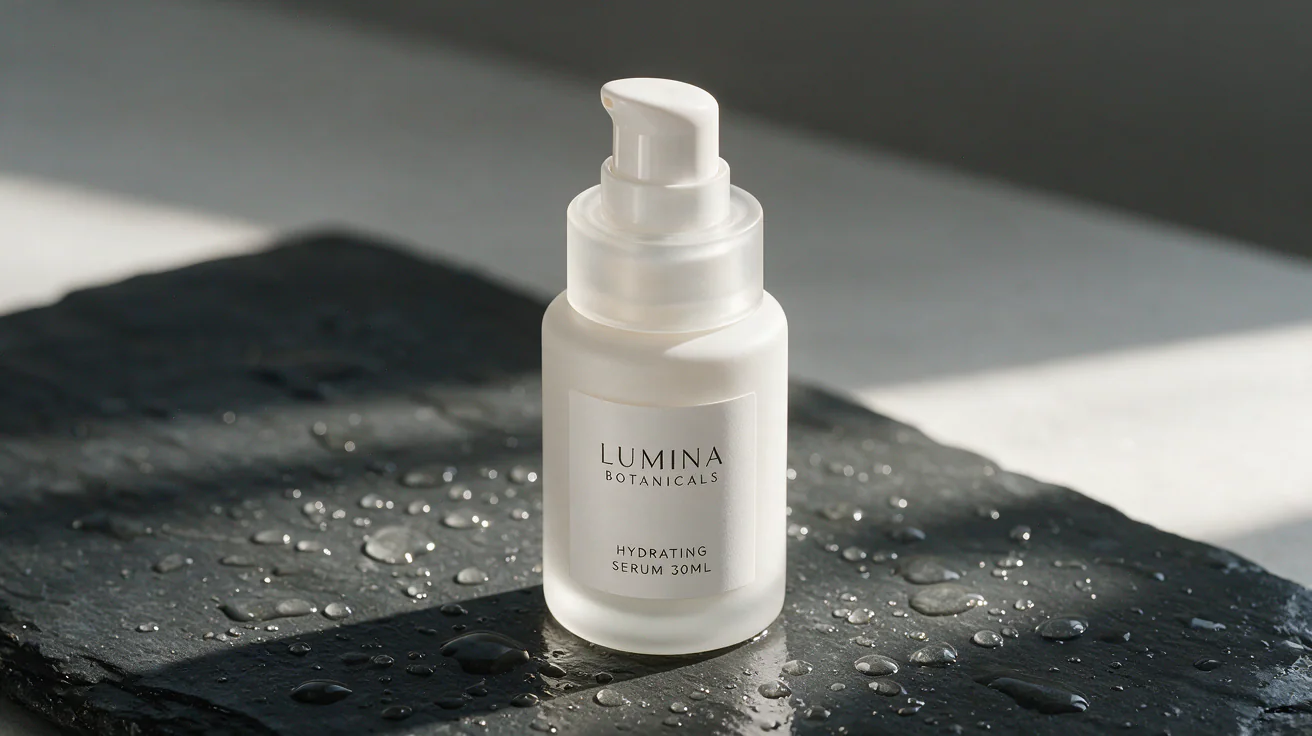
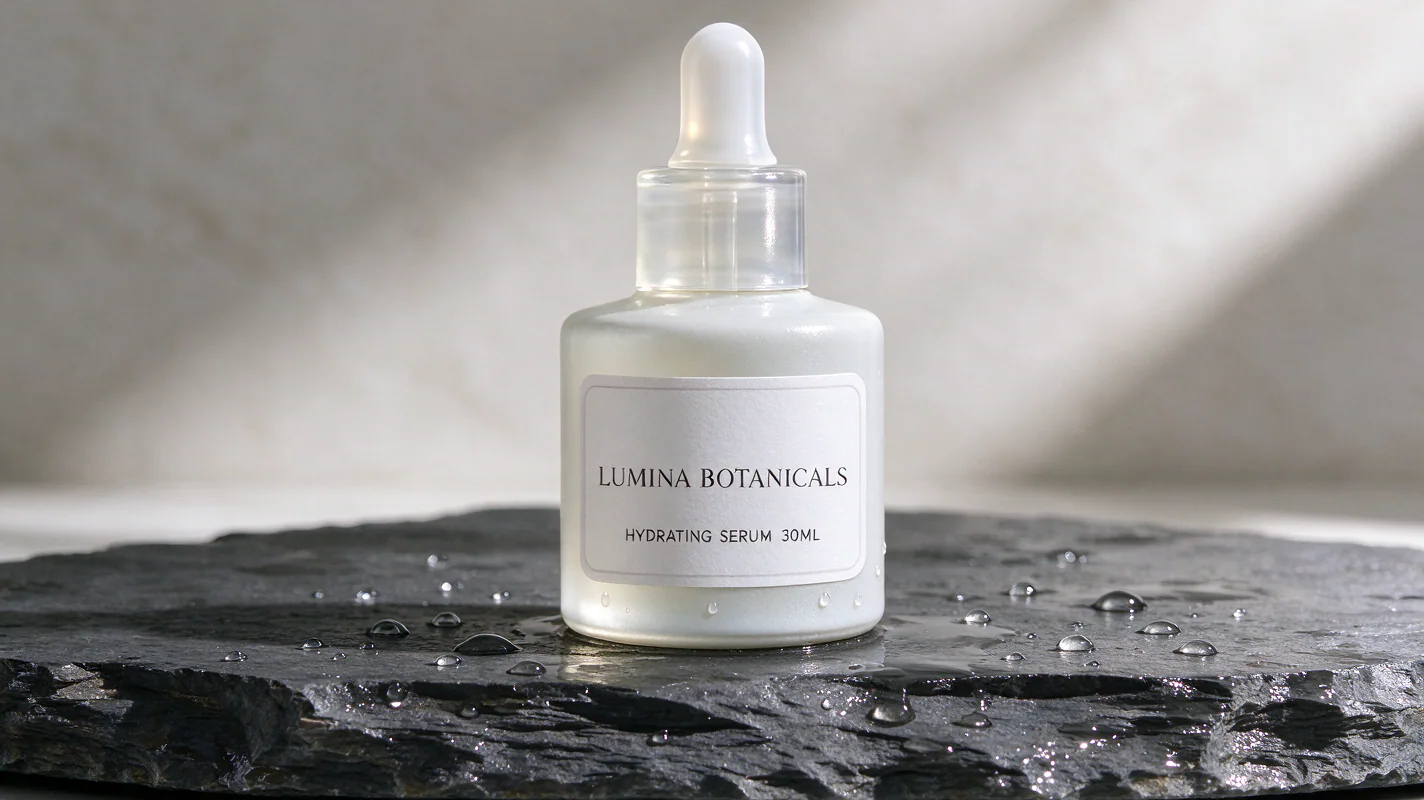
Studio product photography of a frosted ceramic skincare serum bottle sitting on wet slate stone, water droplets, soft directional sunlight. The minimalist white label clearly reads "LUMINA BOTANICALS" and "HYDRATING SERUM 30ML". Ultra-realistic glass and ceramic reflections.
| Seedream 5.5 | Seedream 5.0 Pro |
|---|---|
 |
 |
| Seedream 5.0 Flash | Seedream 5.0 Lite |
|---|---|
 |
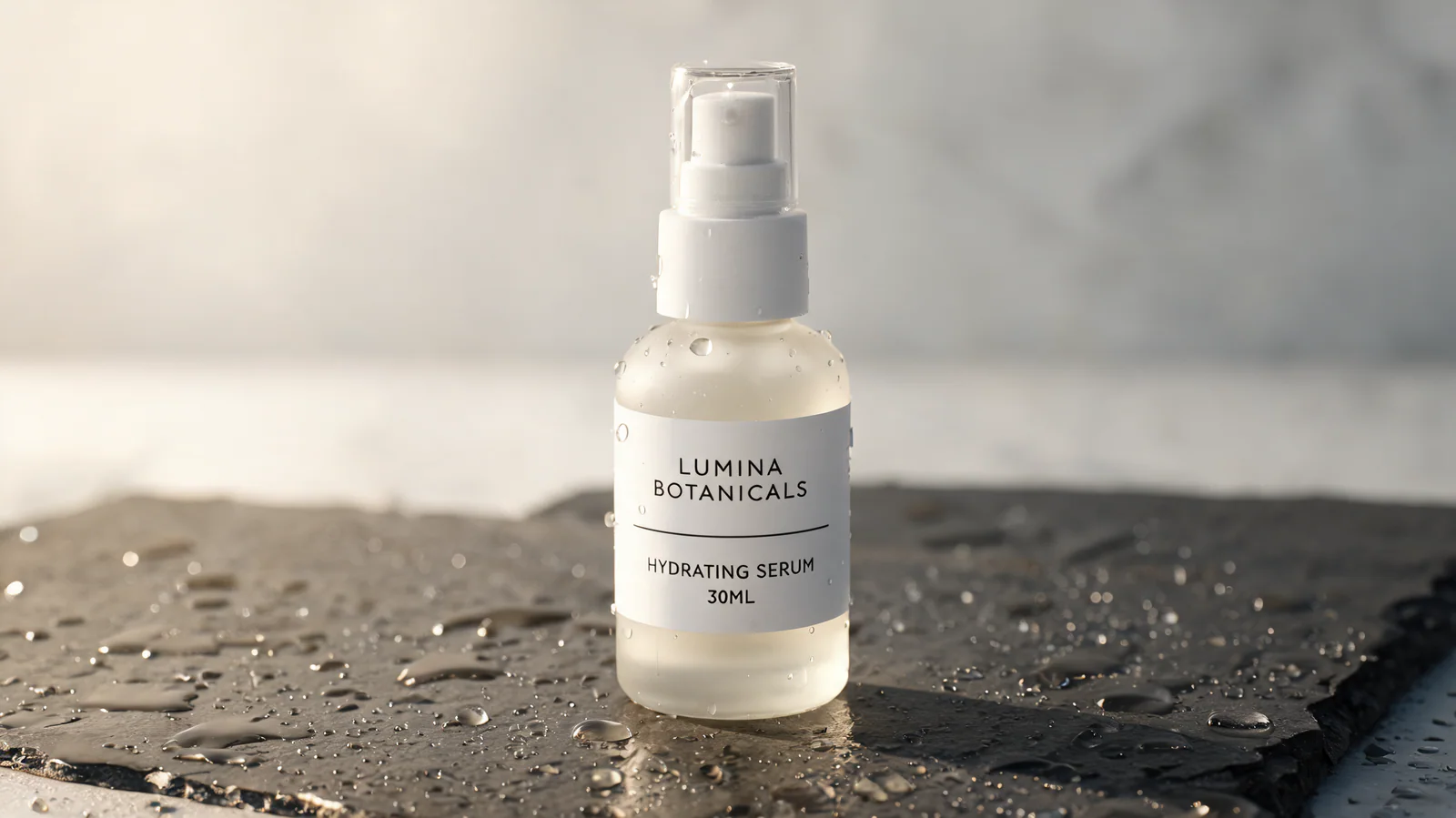 |
All four models spelled both LUMINA BOTANICALS and HYDRATING SERUM 30ML cleanly, which shows how far Seedream 5.x typography has come. Where they differ is staging and lighting:
- Seedream 5.5 chooses a calm, natural window-lit scene with softly blurred stone and leaves behind a translucent frosted dropper bottle, closest in mood to an editorial brand shoot.
- Seedream 5.0 Pro builds a higher-angle studio shot with crisp directional shadows and pronounced specular water beads across the slate.
- Seedream 5.0 Flash gives a clean, evenly lit apothecary bottle and neat rounded label, with slightly simpler stone reflections.
- Seedream 5.0 Lite frames a closer pump bottle with realistic water droplets clinging right to the bottle glass itself.
Test 2: 2D Anime Illustration + Neon Signage
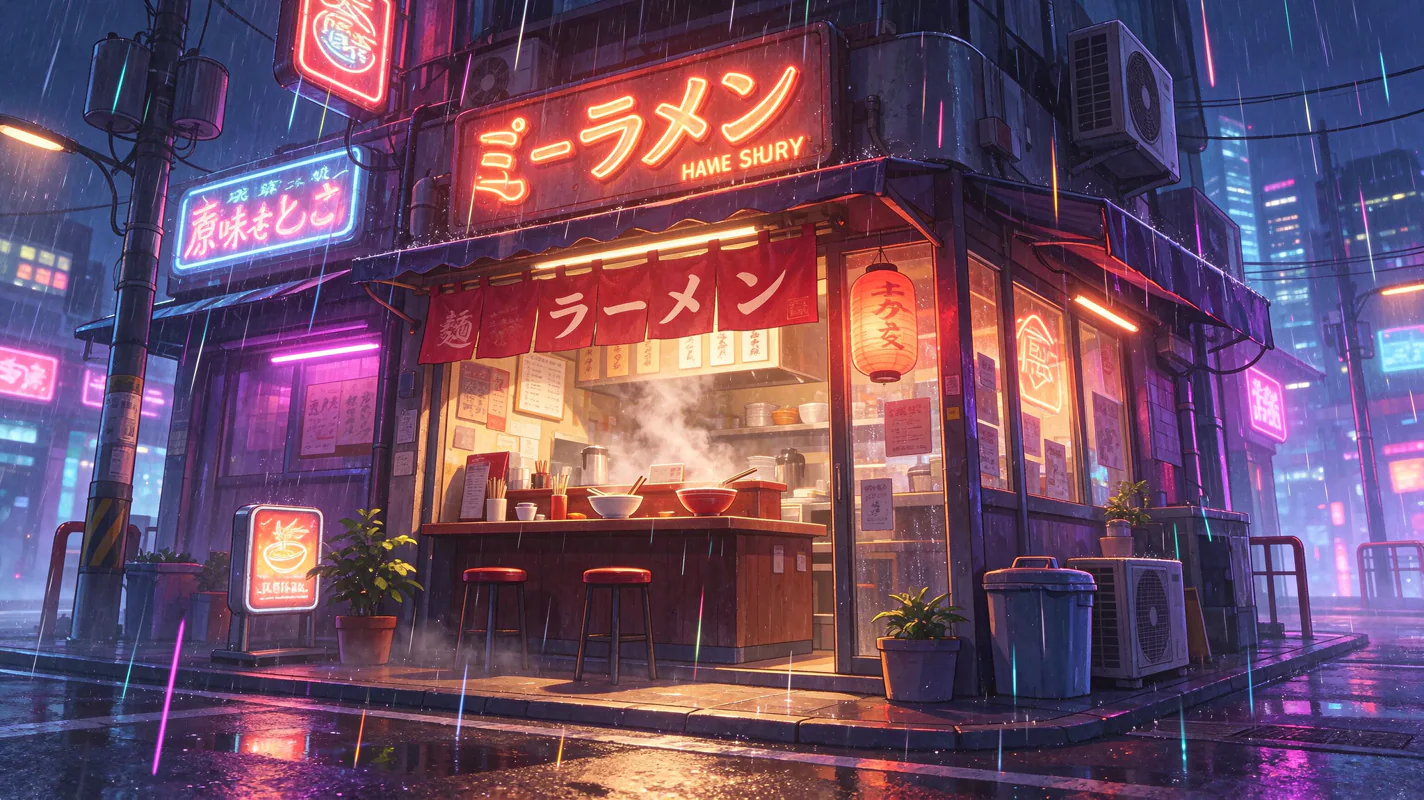
Vibrant 2D anime illustration of a cyberpunk ramen shop at night in the rain, warm neon signs glowing in Japanese and English, cozy steam rising from the counter, rich cel-shaded colors, Makoto Shinkai inspired lighting.
| Seedream 5.5 | Seedream 5.0 Flash | Seedream 4.5 |
|---|---|---|
 |
 |
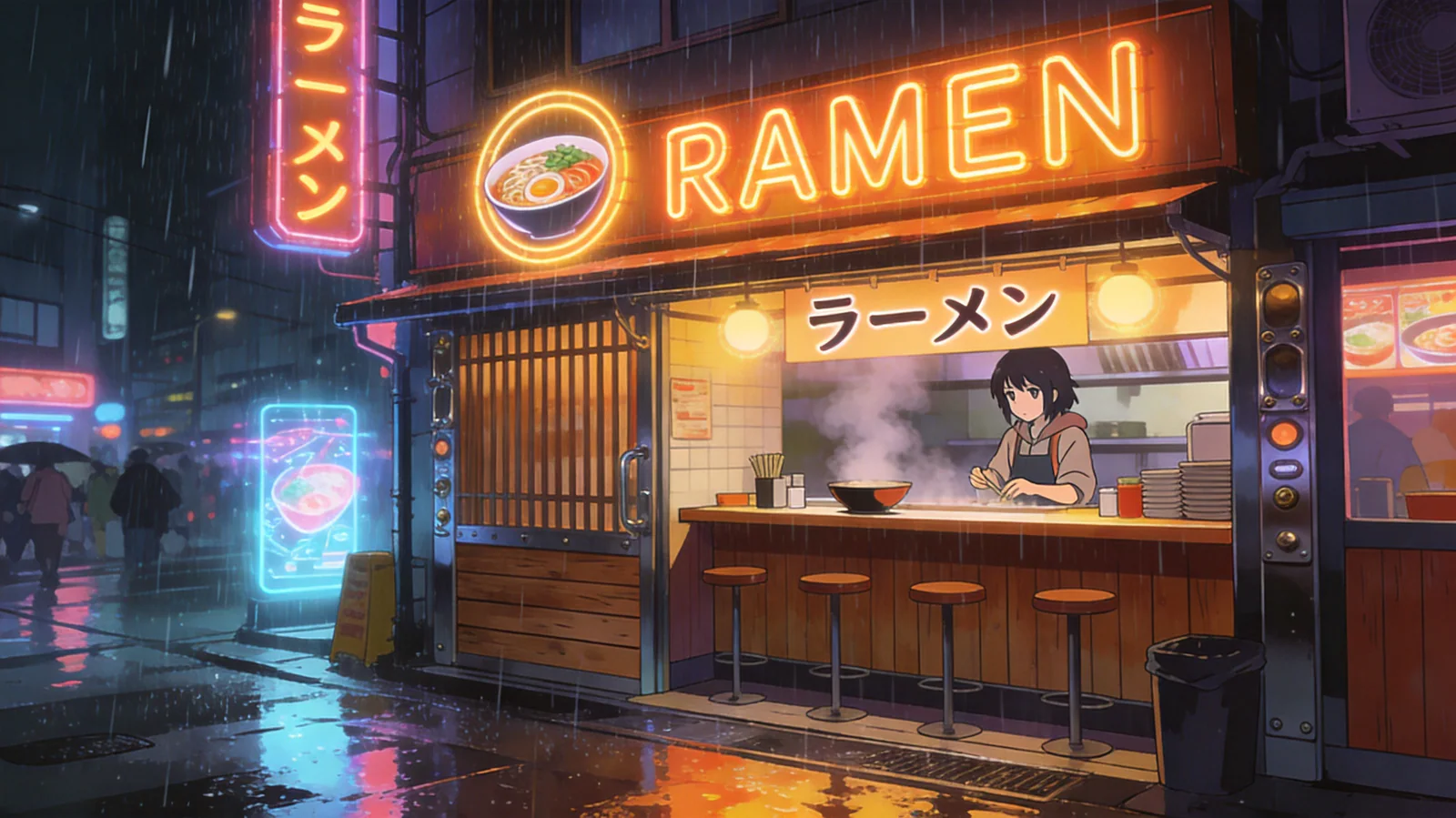 |
Putting the three results next to each other makes the trade-off obvious immediately:
- Seedream 4.5 stays truest to the prompt’s 2D anime request. The cook, stool geometry, cel-shaded wood counter, and both
"RAMEN"and"ラーメン"signs render cleanly without drifting into 3D. - Seedream 5.0 Flash leans painterly and dramatic, packing in rain atmosphere, a chef, and diners bathed in warm amber glow, though tiny secondary signage (
"HOT RAMEL") softens under the brushwork. - Seedream 5.5 delivers rich architectural depth and wet asphalt reflections, but pulls the look toward semi-realistic 2.5D lighting, and stylized neon signage (
"HAME SHURY"and the side kanji sign) still shows occasional lettering drift in busy anime scenes.
Want to compare them on your own prompt? Switch between Seedream 5.5, 5.0 Pro, Flash, Lite, and 4.5 in the same workspace and check the exact credit cost before generating.
Quick Decision Table by Task
| What You Are Making | Pick This Model | Why |
|---|---|---|
| Product cutouts, stickers & logos | Seedream 5.5 | Native Transparent PNG background mode and clean edges. |
| Multi-step photo retouching | Seedream 5.5 | Holds faces, poses, and backgrounds steady across consecutive edits. |
| Menus, flyers & infographics | Seedream 5.0 Pro | Plans margins, columns, and multilingual copy in one layout. |
| Rapid concept drafts & social posts | Seedream 5.0 Flash | Fast output at a flat 40 credits even with references. |
| Complex multi-reference composites | Seedream 5.0 Lite | Accepts up to 14 reference images for a flat 60 credits. |
| Classic 2D anime & cel illustrations | Seedream 4.5 | Keeps crisp 2D lineart and flat shading without 2.5D realism drift. |
Using Seedream Models Inside SugarCube
You can run all five Seedream models in one place without managing separate API keys or regional accounts:
- Generate or combine references: Open AI Image Generator, pick any of the five Seedream models from the selector, choose an aspect ratio and size (
1K,1.5K, or2Kdepending on the model), and toggle Transparent background when using Seedream 5.5. - Edit existing photos or replace text: Open AI Image Editor for whole-image instruction edits and in-image text replacement across Seedream models. (Note: brush and rectangle mask tools in the editor apply only to models that support masks; for Seedream, describe targeted edits in your prompt or upload references.)
- Split finished artwork into layers or resize: Use Layer Decomposition (powered by Seedream 5.5) to separate a composite into transparent PNG layers, or enlarge an exported image 2× locally in your browser with Upscale Image Online.
Frequently Asked Questions
What is the difference between Seedream 5 and Seedream 5.0?
There is no generation difference. Seedream 5 and Seedream 5.0 refer to the same generation of ByteDance image models, released as three variants: Seedream 5.0 Lite, Seedream 5.0 Pro, and Seedream 5.0 Flash. When a platform labels a model simply as "Seedream 5" (seedream-5-0), it means Seedream 5.0 Lite.
Is Seedream 5.5 always better than Seedream 5.0 Pro?
For most everyday work (product photos, portraits, transparent PNGs, and multi-round edits), yes, and Seedream 5.5 also costs fewer credits for text-to-image (40–60 vs. 70–140). Seedream 5.0 Pro is still worth picking when you want structured multi-column infographics or full poster layouts planned from scratch.
Which Seedream model supports transparent backgrounds?
Seedream 5.5 supports native transparent PNG output. Turn on the Transparent background option before generating in SugarCube to export clean cutouts with alpha transparency. You can also split existing images into separate transparent layers using Layer Decomposition.
Can Seedream handle text in posters, menus, and product labels?
Yes. Seedream 5.5 and Seedream 5.0 Pro are both strong with text. Use 5.0 Pro when organizing full-page menus or multilingual posters, and use 5.5 for small product labels and packaging copy (0.4% serious error rate in ByteDance’s bilingual tests). Keep in mind that busy stylized scenes, like dense anime neon signs, can still occasionally scramble secondary words, so always inspect output text before publishing.
What resolutions do Seedream models support on SugarCube?
In SugarCube’s current workspace controls, Seedream 5.5 and Seedream 5.0 Flash offer 1K, 1.5K, and 2K, while Seedream 5.0 Pro, 5.0 Lite, and 4.5 expose 1K and 2K (2K on 5.0 Pro excludes 16:9 and 9:16). ByteDance’s upstream documentation also notes 3K support on 5.0 Lite and 4K on 4.5; if you need larger pixel dimensions locally, you can run a 2× browser resize with Upscale Image Online.
How many reference images and credits does each Seedream model use?
Seedream 5.0 Lite accepts up to 14 reference images (60 credits flat). Seedream 5.5, 5.0 Pro, 5.0 Flash, and 4.5 each accept up to 10 reference images. Seedream 5.0 Flash stays at a flat 40 credits regardless of size or references, 4.5 is 70 credits flat, while 5.5 (40–60 base) and 5.0 Pro (70–140 base) adjust with reference count and show the exact quote before you generate.
Create
See how Seedream 5.5, 5.0 Pro, Flash, Lite, and 4.5 differ in real tests: 100-round editing stability, transparent PNGs, label text, credits, and studio options.
Create images in SugarCube